> ## Documentation Index
> Fetch the complete documentation index at: https://portkey-docs-add-third-party-integration-issues-fixes.mintlify.site/llms.txt
> Use this file to discover all available pages before exploring further.
# Vercel
> Integrate Portkey with Vercel AI SDK for production-ready and reliable AI apps
Portkey natively integrates with the Vercel AI SDK to make your apps production-ready and reliable. Just import Portkey's Vercel package and use it as a provider in your Vercel AI app to enable all of Portkey features:
* Full-stack observability and tracing for all requests
* Interoperability across 250+ LLMS
* Built-in 50+ SOTA guardrails
* Simple & semantic caching to save costs & time
* Route requests conditionally and make them robust with fallbacks, load-balancing, automatic retries, and more
* Continuous improvement based on user feedback
## Getting Started
### 1. Installation
```sh theme={null}
npm install @portkey-ai/vercel-provider
```
### 2. Import & Configure Portkey Object
[Sign up for Portkey ](https://portkey.ai)and get your API key, and configure Portkey provider in your Vercel app:
```typescript theme={null}
import { createPortkey } from '@portkey-ai/vercel-provider';
const portkeyConfig = {
"provider": "openai", // Choose your provider (e.g., 'anthropic')
"api_key": "OPENAI_API_KEY",
"override_params": {
"model": "gpt-4o" // Select from 250+ models
}
};
const portkey = createPortkey({
apiKey: 'YOUR_PORTKEY_API_KEY',
config: portkeyConfig,
});
```
Portkey's configs are a powerful way to manage & govern your app's behaviour. Learn more about Configs [here](/product/ai-gateway/configs).
## Using Vercel Functions
Portkey provider works with all of Vercel functions `generateText` & `streamText`.
Here's how to use them with Portkey:
```typescript generateText theme={null}
import { createPortkey } from '@portkey-ai/vercel-provider';
import { generateText } from 'ai';
const portkeyConfig = {
"provider": "openai", // Choose your provider (e.g., 'anthropic')
"api_key": "OPENAI_API_KEY",
"override_params": {
"model": "gpt-4o"
}
};
const portkey = createPortkey({
apiKey: 'YOUR_PORTKEY_API_KEY',
config: portkeyConfig,
});
const { text } = await generateText({
model: portkey.chatModel(''), // Provide an empty string, we defined the model in the config
prompt: 'What is Portkey?',
});
console.log(text);
```
```typescript streamText theme={null}
import { createPortkey } from '@portkey-ai/vercel-provider';
import { streamText } from 'ai';
const portkeyConfig = {
"provider": "openai", // Choose your provider (e.g., 'anthropic')
"api_key": "OPENAI_API_KEY",
"override_params": {
"model": "gpt-4o" // Select from 250+ models
}
};
const portkey = createPortkey({
apiKey: 'YOUR_PORTKEY_API_KEY',
config: portkeyConfig,
});
const result = await streamText({
model: portkey('gpt-4-turbo'), // This gets overwritten by config
prompt: 'Invent a new holiday and describe its traditions.',
});
for await (const chunk of result) {
console.log(chunk);
}
```
Portkey supports `chatModel` and `completionModel` to easily handle chatbots or text completions. In the above examples, we used `portkey.chatModel` for generateText and `portkey.completionModel` for streamText.
### Tool Calling with Portkey
Portkey supports Tool calling with Vercel AI SDK. Here's how-
```typescript theme={null}
import { z } from 'zod';
import { generateText, tool } from 'ai';
const result = await generateText({
model: portkey.chatModel('gpt-4-turbo'),
tools: {
weather: tool({
description: 'Get the weather in a location',
parameters: z.object({
location: z.string().describe('The location to get the weather for'),
}),
execute: async ({ location }) => ({
location,
temperature: 72 + Math.floor(Math.random() * 21) - 10,
}),
}),
},
prompt: 'What is the weather in San Francisco?',
});
```
## Portkey Features
Portkey Helps you make your Vercel app more robust and reliable. The portkey config is a modular way to make it work for you in whatever way you want.
### [Interoperability](/product/ai-gateway/universal-api)
Portkey allows you to easily switch between 250+ AI models by simply changing the model name in your configuration. This flexibility enables you to adapt to the evolving AI landscape without significant code changes.
```javascript Switch from OpenAI to Anthropic theme={null}
const portkeyConfig = {
"provider": "openai",
"api_key": "OPENAI_API_KEY",
"override_params": {
"model": "gpt-4o"
}
};
```
```javascript Anthropic theme={null}
const portkeyConfig = {
"provider": "anthropic",
"api_key": "Anthropic_API_KEY",
"override_params": {
"model": "claude-3-5-sonnet-20240620"
}
};
```
### [Observability](/product/observability)
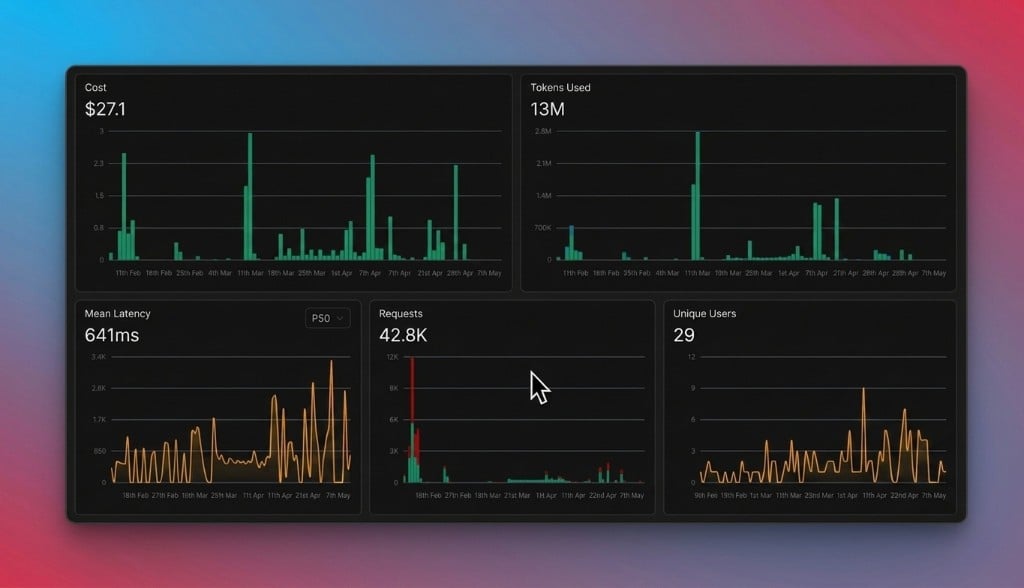
Portkey's OpenTelemetry-compliant observability suite gives you complete control over all your requests. And Portkey's analytics dashboards provide **40**+ key insights you're looking for including cost, tokens, latency, etc. Fast.
 ### Reliability
Portkey enhances the robustness of your AI applications with built-in features such as [Caching](/product/ai-gateway/cache-simple-and-semantic), [Fallback](/product/ai-gateway/fallbacks) mechanisms, [Load balancing](/product/ai-gateway/load-balancing), [Conditional routing](/product/ai-gateway/conditional-routing), [Request timeouts](/product/ai-gateway/request-timeouts), etc.
Here is how you can modify your config to include the following Portkey features-
```javascript Fallback theme={null}
import { createPortkey } from '@portkey-ai/vercel-provider';
import { generateText } from 'ai';
const portkeyConfig = {
"strategy": {
"mode": "fallback"
},
"targets": [
{
"provider": "anthropic",
"api_key": "Anthropic_API_KEY",
"override_params": {
"model": "claude-3-5-sonnet-20240620"
} },
{
"provider": "openai",
"api_key": "OPENAI_API_KEY",
"override_params": {
"model": "gpt-4o"
} }
]
}
const portkey = createPortkey({
apiKey: 'YOUR_PORTKEY_API_KEY',
config: portkeyConfig,
});
const { text } = await generateText({
model: portkey.chatModel(''),
prompt: 'What is Portkey?',
});
console.log(text);
```
```javascript Caching theme={null}
import { createPortkey } from '@portkey-ai/vercel-provider';
import { generateText } from 'ai';
const portkeyConfig = { "cache": { "mode": "semantic" } }
const portkey = createPortkey({
apiKey: 'YOUR_PORTKEY_API_KEY',
config: portkeyConfig,
});
const { text } = await generateText({
model: portkey.chatModel(''),
prompt: 'What is Portkey?',
});
console.log(text);
```
```javascript Conditional routing theme={null}
const portkey_config = {
"strategy": {
"mode": "conditional",
"conditions": [
...conditions
],
"default": "target_1"
},
"targets": [
{
"name": "target_1",
"provider": "anthropic",
"api_key": "Anthropic_API_KEY",
"override_params": {
"model": "claude-3-5-sonnet-20240620"
}
},
{
"name": "target_2",
"provider": "openai",
"api_key": "OpenAI_api_key",
"override_params": {
"model": "gpt-4o"
}
}
]
}
```
Learn more about Portkey's AI gateway features in detail [here](/product/ai-gateway/).
### [Guardrails](/product/guardrails/)
Portkey Guardrails allow you to enforce LLM behavior in real-time, verifying both inputs and outputs against specified checks.
You can create Guardrail checks in UI and then pass them in your Portkey Configs with before request or after request hooks.
[Read more about Guardrails here](/product/guardrails/).
## [Portkey Config](/product/ai-gateway/configs)
Many of these features are driven by Portkey's Config architecture. The Portkey app simplifies creating, managing, and versioning your Configs.
For more information on using these features and setting up your Config, please refer to the [Portkey documentation](/product/ai-gateway/configs).
### Reliability
Portkey enhances the robustness of your AI applications with built-in features such as [Caching](/product/ai-gateway/cache-simple-and-semantic), [Fallback](/product/ai-gateway/fallbacks) mechanisms, [Load balancing](/product/ai-gateway/load-balancing), [Conditional routing](/product/ai-gateway/conditional-routing), [Request timeouts](/product/ai-gateway/request-timeouts), etc.
Here is how you can modify your config to include the following Portkey features-
```javascript Fallback theme={null}
import { createPortkey } from '@portkey-ai/vercel-provider';
import { generateText } from 'ai';
const portkeyConfig = {
"strategy": {
"mode": "fallback"
},
"targets": [
{
"provider": "anthropic",
"api_key": "Anthropic_API_KEY",
"override_params": {
"model": "claude-3-5-sonnet-20240620"
} },
{
"provider": "openai",
"api_key": "OPENAI_API_KEY",
"override_params": {
"model": "gpt-4o"
} }
]
}
const portkey = createPortkey({
apiKey: 'YOUR_PORTKEY_API_KEY',
config: portkeyConfig,
});
const { text } = await generateText({
model: portkey.chatModel(''),
prompt: 'What is Portkey?',
});
console.log(text);
```
```javascript Caching theme={null}
import { createPortkey } from '@portkey-ai/vercel-provider';
import { generateText } from 'ai';
const portkeyConfig = { "cache": { "mode": "semantic" } }
const portkey = createPortkey({
apiKey: 'YOUR_PORTKEY_API_KEY',
config: portkeyConfig,
});
const { text } = await generateText({
model: portkey.chatModel(''),
prompt: 'What is Portkey?',
});
console.log(text);
```
```javascript Conditional routing theme={null}
const portkey_config = {
"strategy": {
"mode": "conditional",
"conditions": [
...conditions
],
"default": "target_1"
},
"targets": [
{
"name": "target_1",
"provider": "anthropic",
"api_key": "Anthropic_API_KEY",
"override_params": {
"model": "claude-3-5-sonnet-20240620"
}
},
{
"name": "target_2",
"provider": "openai",
"api_key": "OpenAI_api_key",
"override_params": {
"model": "gpt-4o"
}
}
]
}
```
Learn more about Portkey's AI gateway features in detail [here](/product/ai-gateway/).
### [Guardrails](/product/guardrails/)
Portkey Guardrails allow you to enforce LLM behavior in real-time, verifying both inputs and outputs against specified checks.
You can create Guardrail checks in UI and then pass them in your Portkey Configs with before request or after request hooks.
[Read more about Guardrails here](/product/guardrails/).
## [Portkey Config](/product/ai-gateway/configs)
Many of these features are driven by Portkey's Config architecture. The Portkey app simplifies creating, managing, and versioning your Configs.
For more information on using these features and setting up your Config, please refer to the [Portkey documentation](/product/ai-gateway/configs).