> ## Documentation Index
> Fetch the complete documentation index at: https://portkey-docs-add-third-party-integration-issues-fixes.mintlify.site/llms.txt
> Use this file to discover all available pages before exploring further.
# Quickstart
> Get started with Agent Gateway
Modify the API key permissions and turn on the toggle for **Agent Gateway** to enable Agent Gateway for your API key. Create or edit a key on the [API Keys](https://app.portkey.ai/api-keys) page, and enable the `agents.invoke` scope when you will invoke agents with that key. For how Portkey API keys and scopes work, see [API keys, authentication, and authorization](/product/enterprise-offering/org-management/api-keys-authn-and-authz).
All you need to get started is an agent server.
For this quickstart, we will be using an [A2A agent](https://a2a-protocol.org/latest/topics/what-is-a2a/#understanding-the-agent-stack-a2a-mcp-agent-frameworks-and-models).
Make use of one of the following agent servers and configure it as the
upstream agent server. This is used to fetch the agent card and authenticate
requests.
[https://hello.a2aregistry.org](https://hello.a2aregistry.org)
[https://a2a-header-auth.ayush-0a3.workers.dev](https://a2a-header-auth.ayush-0a3.workers.dev)
headers: `Authorization: Bearer secret-key-1`
You can host your own A2A Agent server following the instructions in the
[Agent Server
SDK](https://a2a-protocol.org/latest/tutorials/python/1-introduction/)
documentation.
Access the [Agent
Registry](https://app.portkey.ai/agent-integrations/integrated) and
configure the agent server URL.
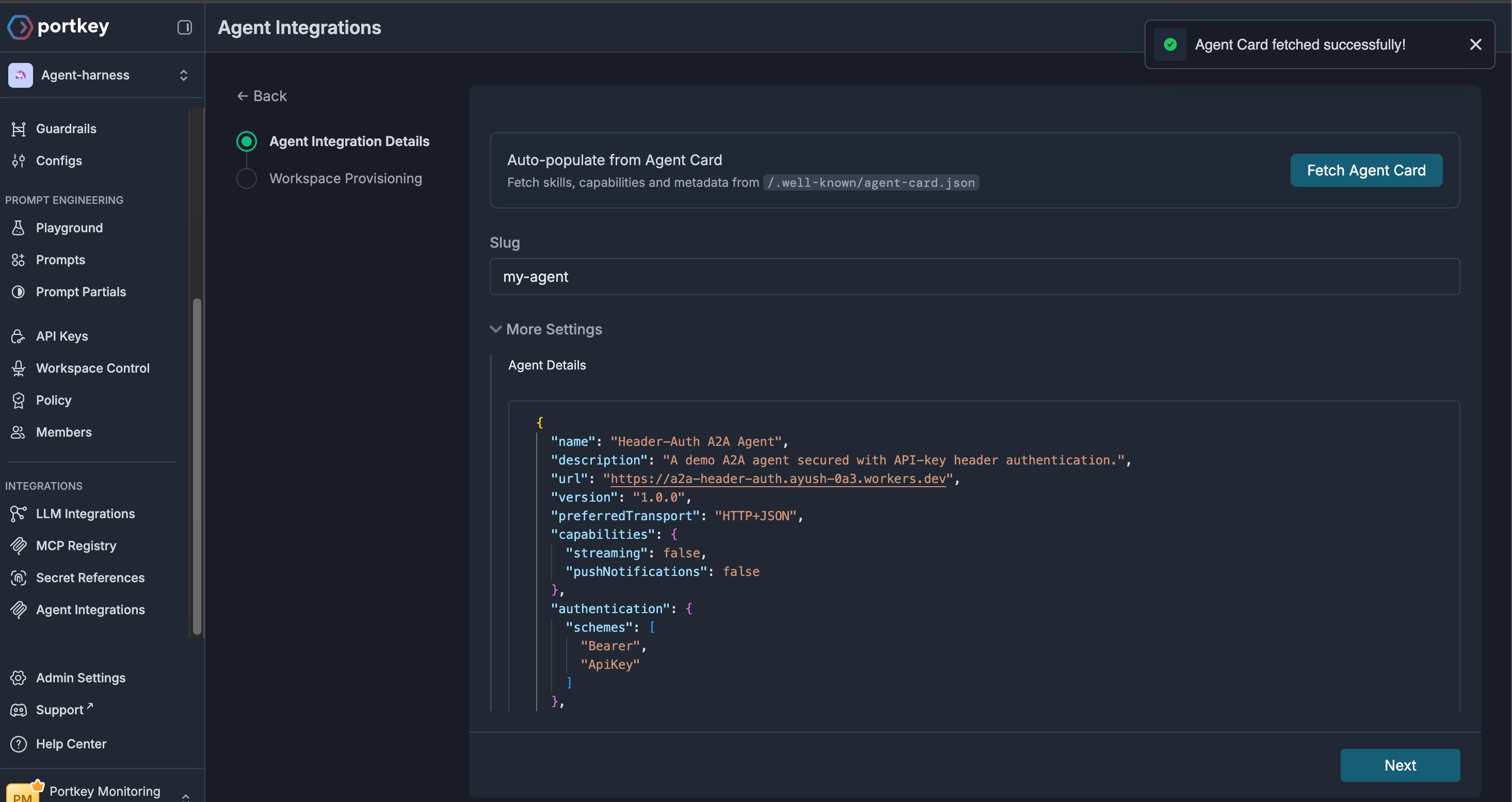
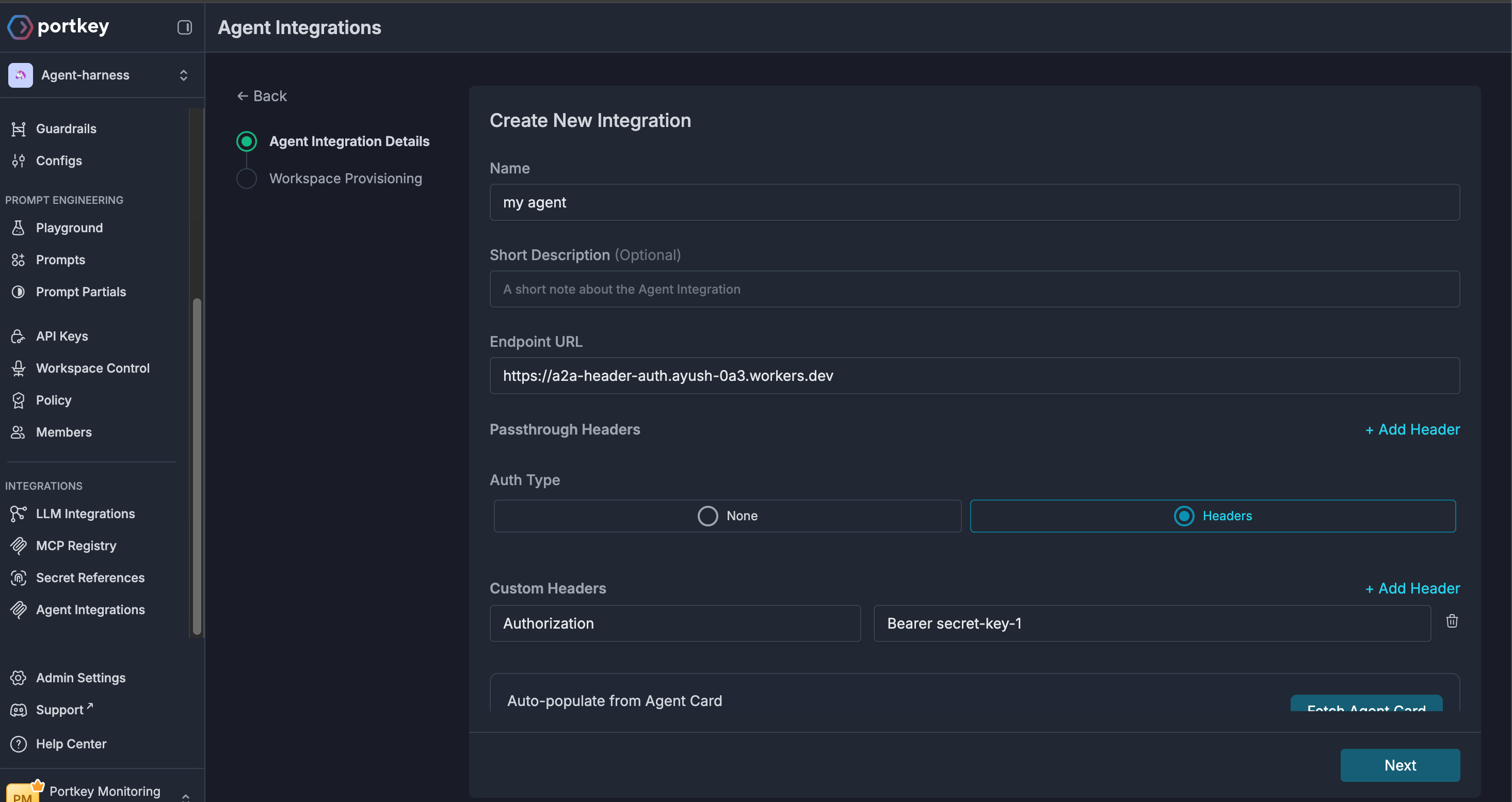 Validate transport and authentication schemes by clicking the `Fetch
Agent Card` button. The upstream URL must be a public `http`/`https` endpoint (Backend `v1.16.1+` applies SSRF protections and rejects private IPs, metadata hosts, and URLs with `#` fragments).
Validate transport and authentication schemes by clicking the `Fetch
Agent Card` button. The upstream URL must be a public `http`/`https` endpoint (Backend `v1.16.1+` applies SSRF protections and rejects private IPs, metadata hosts, and URLs with `#` fragments).
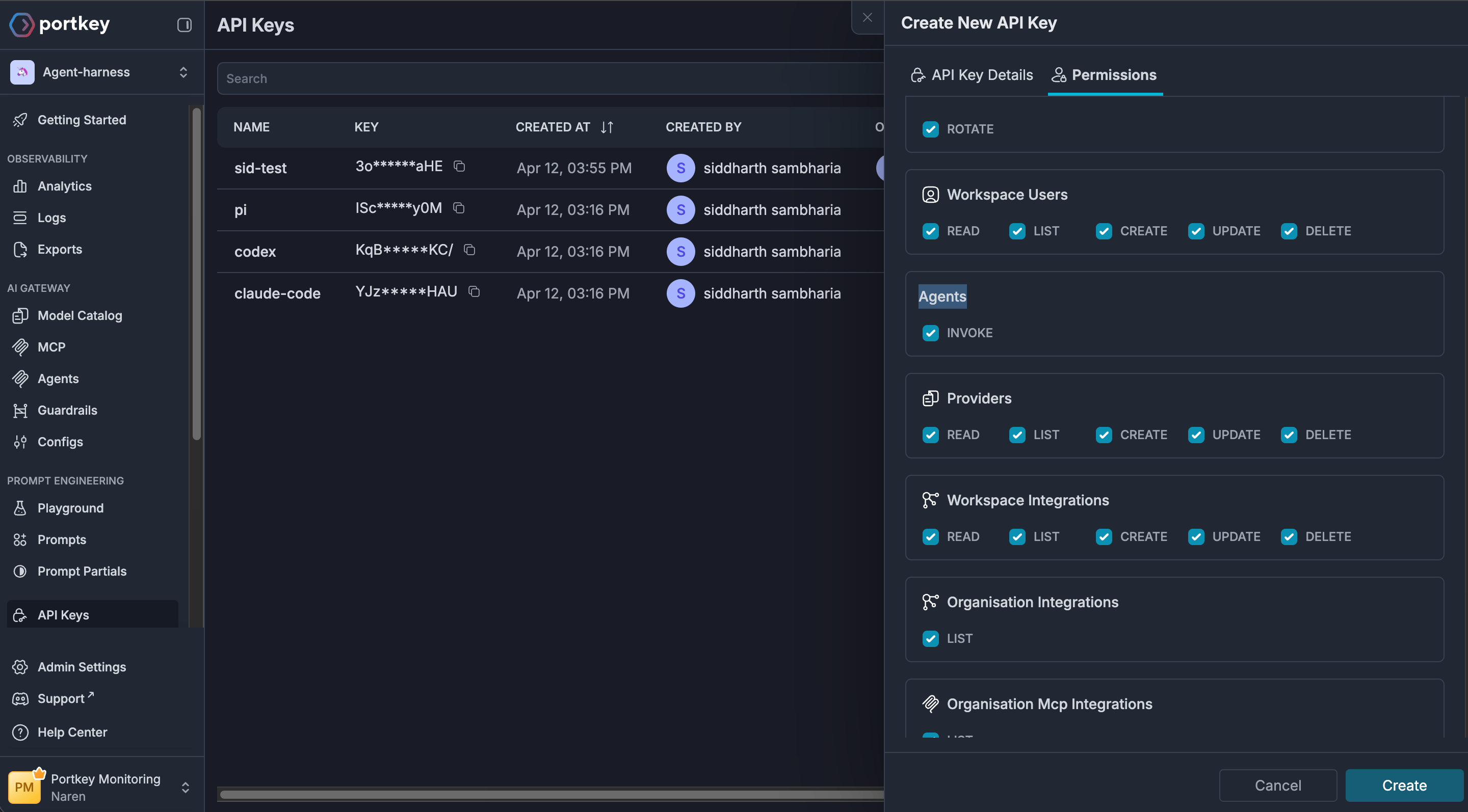
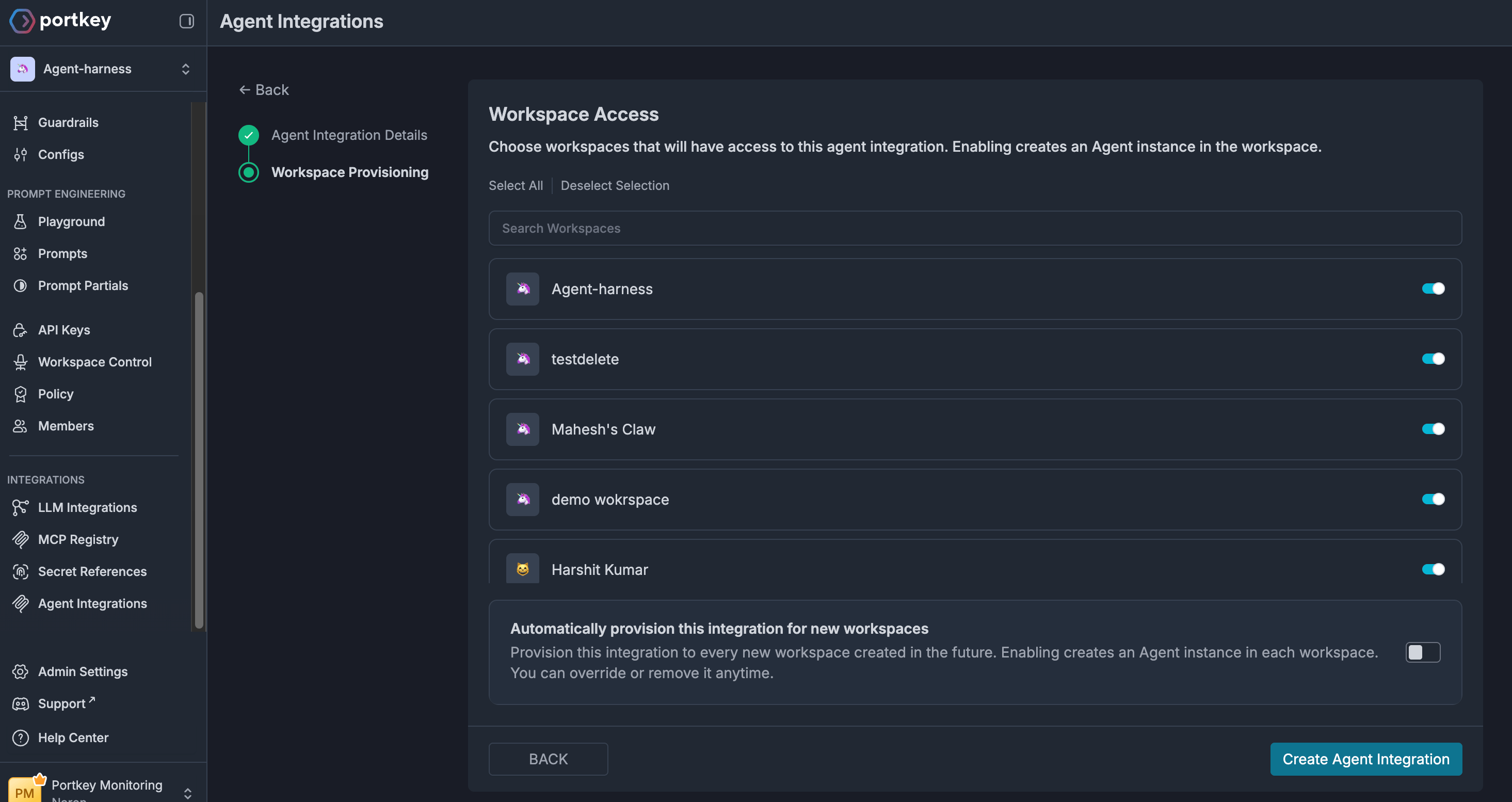 Head over to the [API Keys](https://app.portkey.ai/api-keys) page and
create a new API key. Make sure the `agents.invoke` scope is enabled for
your API key.
Head over to the [API Keys](https://app.portkey.ai/api-keys) page and
create a new API key. Make sure the `agents.invoke` scope is enabled for
your API key.
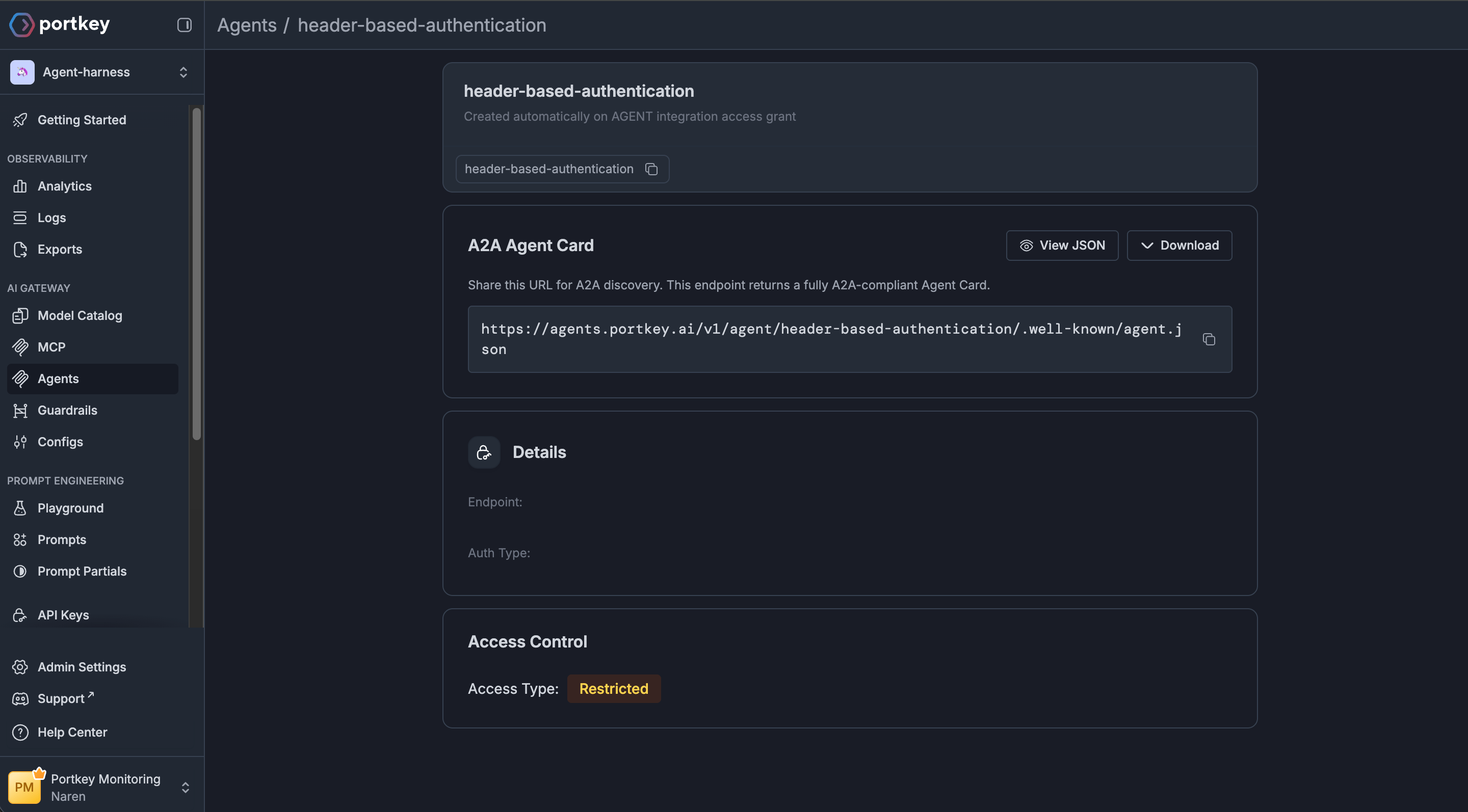
 Open the [Agents](https://app.portkey.ai/agents) tab and fetch the
corresponding agent server URL. This is the URL you will use to connect
your agent to the Portkey Agent Gateway instead of the agent server URL.
It looks something like this (you can replace the agent slug with your
server's slug):
`https://agents.portkey.ai/v1/agent/header-based-authentication`
Open the [Agents](https://app.portkey.ai/agents) tab and fetch the
corresponding agent server URL. This is the URL you will use to connect
your agent to the Portkey Agent Gateway instead of the agent server URL.
It looks something like this (you can replace the agent slug with your
server's slug):
`https://agents.portkey.ai/v1/agent/header-based-authentication`
 ## Interface with your agent
You can simply replace your agent server URL with the one you fetched
from the agents tab and test out the integration.
Alternatively, make use of one of the code snippets below!
```shell cURL theme={null}
curl --location --request POST 'https://agents.portkey.ai/v1/agent/{agent-slug}/.well-known/agent.json' \
--header 'Content-Type: application/json' \
--header 'x-portkey-api-key: {PORTKEY_API_KEY}'
```
```python python theme={null}
import asyncio
import json
from a2a.client import A2ACardResolver
import httpx
BASE_URL = "https://agents.portkey.ai/v1/agent/{agent-slug}"
API_KEY = "{PORTKEY_API_KEY}"
async def log_httpx_request(request: httpx.Request) -> None:
try:
body = request.content.decode("utf-8") if request.content else ""
except Exception:
body = ""
print(f"[httpx] {request.method} {request.url}")
print(f"[httpx] body: {body}\n")
async def main() -> None:
print(f"Fetching agent card from {BASE_URL}...")
async with httpx.AsyncClient(
base_url=BASE_URL,
headers={"x-portkey-api-key": API_KEY},
event_hooks={"request": [log_httpx_request]},
) as client:
resolver = A2ACardResolver(httpx_client=client, base_url=BASE_URL)
agent_card = await resolver.get_agent_card()
print(json.dumps(agent_card.model_dump(mode="json", exclude_none=True), indent=2))
if __name__ == "__main__":
asyncio.run(main())
```
```javascript JavaScript theme={null}
import {
DefaultAgentCardResolver,
ClientFactory,
ClientFactoryOptions,
} from "@a2a-js/sdk/client";
const BASE_URL = "https://agents.portkey.ai/v1/agent/{agent-slug}";
const API_KEY = "{PORTKEY_API_KEY}";
class HeaderAuthInterceptor {
async before(args) {
args.options = {
...args.options,
serviceParameters: {
...(args.options?.serviceParameters || {}),
"x-portkey-api-key": API_KEY,
},
};
}
async after() {}
}
function createAuthenticatedFetch() {
return async (input, init = {}) => {
const headers = new Headers(init.headers || {});
headers.set("x-portkey-api-key", API_KEY);
return fetch(input, { ...init, headers });
};
}
async function main() {
console.log(`Fetching agent card from ${BASE_URL}...`);
const authFetch = createAuthenticatedFetch();
const resolverBaseUrl = BASE_URL.endsWith("/") ? BASE_URL : `${BASE_URL}/`;
const options = ClientFactoryOptions.createFrom(
ClientFactoryOptions.default,
{
cardResolver: new DefaultAgentCardResolver({
fetchImpl: authFetch,
}),
clientConfig: { interceptors: [new HeaderAuthInterceptor()] },
},
);
const factory = new ClientFactory(options);
const client = await factory.createFromUrl(resolverBaseUrl);
const card = client.agentCard;
if (!card) {
throw new Error("Unable to read agent card from SDK client instance.");
}
console.log(JSON.stringify(card, null, 2));
}
main().catch((error) => {
console.error(error);
process.exit(1);
});
```
## Further reading
Manage your agent integrations and control access to agents and their skills.
Learn how virtual agent servers work and how to host your own.
Explore additional examples for fetching agent cards and invoking agents.
Configure API keys and scopes to securely invoke your agents.
## Interface with your agent
You can simply replace your agent server URL with the one you fetched
from the agents tab and test out the integration.
Alternatively, make use of one of the code snippets below!
```shell cURL theme={null}
curl --location --request POST 'https://agents.portkey.ai/v1/agent/{agent-slug}/.well-known/agent.json' \
--header 'Content-Type: application/json' \
--header 'x-portkey-api-key: {PORTKEY_API_KEY}'
```
```python python theme={null}
import asyncio
import json
from a2a.client import A2ACardResolver
import httpx
BASE_URL = "https://agents.portkey.ai/v1/agent/{agent-slug}"
API_KEY = "{PORTKEY_API_KEY}"
async def log_httpx_request(request: httpx.Request) -> None:
try:
body = request.content.decode("utf-8") if request.content else ""
except Exception:
body = ""
print(f"[httpx] {request.method} {request.url}")
print(f"[httpx] body: {body}\n")
async def main() -> None:
print(f"Fetching agent card from {BASE_URL}...")
async with httpx.AsyncClient(
base_url=BASE_URL,
headers={"x-portkey-api-key": API_KEY},
event_hooks={"request": [log_httpx_request]},
) as client:
resolver = A2ACardResolver(httpx_client=client, base_url=BASE_URL)
agent_card = await resolver.get_agent_card()
print(json.dumps(agent_card.model_dump(mode="json", exclude_none=True), indent=2))
if __name__ == "__main__":
asyncio.run(main())
```
```javascript JavaScript theme={null}
import {
DefaultAgentCardResolver,
ClientFactory,
ClientFactoryOptions,
} from "@a2a-js/sdk/client";
const BASE_URL = "https://agents.portkey.ai/v1/agent/{agent-slug}";
const API_KEY = "{PORTKEY_API_KEY}";
class HeaderAuthInterceptor {
async before(args) {
args.options = {
...args.options,
serviceParameters: {
...(args.options?.serviceParameters || {}),
"x-portkey-api-key": API_KEY,
},
};
}
async after() {}
}
function createAuthenticatedFetch() {
return async (input, init = {}) => {
const headers = new Headers(init.headers || {});
headers.set("x-portkey-api-key", API_KEY);
return fetch(input, { ...init, headers });
};
}
async function main() {
console.log(`Fetching agent card from ${BASE_URL}...`);
const authFetch = createAuthenticatedFetch();
const resolverBaseUrl = BASE_URL.endsWith("/") ? BASE_URL : `${BASE_URL}/`;
const options = ClientFactoryOptions.createFrom(
ClientFactoryOptions.default,
{
cardResolver: new DefaultAgentCardResolver({
fetchImpl: authFetch,
}),
clientConfig: { interceptors: [new HeaderAuthInterceptor()] },
},
);
const factory = new ClientFactory(options);
const client = await factory.createFromUrl(resolverBaseUrl);
const card = client.agentCard;
if (!card) {
throw new Error("Unable to read agent card from SDK client instance.");
}
console.log(JSON.stringify(card, null, 2));
}
main().catch((error) => {
console.error(error);
process.exit(1);
});
```
## Further reading
Manage your agent integrations and control access to agents and their skills.
Learn how virtual agent servers work and how to host your own.
Explore additional examples for fetching agent cards and invoking agents.
Configure API keys and scopes to securely invoke your agents.