> ## Documentation Index
> Fetch the complete documentation index at: https://portkey-docs-add-third-party-integration-issues-fixes.mintlify.site/llms.txt
> Use this file to discover all available pages before exploring further.
# Exa Online Search
> Transform offline LLMs into online models with real-time internet search capabilities.
[Exa](https://exa.ai) provides a powerful search API that seamlessly integrates with your LLM applications, enabling real-time internet access for any model. When integrated with Portkey, Exa transforms requests by adding relevant search results before they reach the model, effectively turning offline models into online models.
Learn more about Exa and their offerings.
## How Exa Online Search Works
The Exa Online Search plugin automatically adds a context window with relevant search results from the internet before your prompt reaches the LLM:
1. **User sends a prompt** requiring up-to-date information
2. **Portkey intercepts the request** and sends a search query to Exa
3. **Exa returns relevant search results** from across the web
4. **Search results are added as context** to the original prompt
5. **Enhanced prompt is sent to the LLM** which now has access to current information
This process allows any LLM to respond with up-to-date knowledge without retraining or fine-tuning.
## Setting Up Exa Online Search
### 1. Enable Exa Plugin in Portkey
* Navigate to `Settings` → `Plugins` in the sidebar
* Find Exa in the list of available plugins and click "Enable"
* Enter your Exa API key (obtain this from your [Exa dashboard](https://exa.ai))
* Save your settings
### 2. Create an Exa Guardrail in Portkey
* Navigate to the `Guardrails` page and click `Create`
* Search for "Exa Online Search" and click `Add`
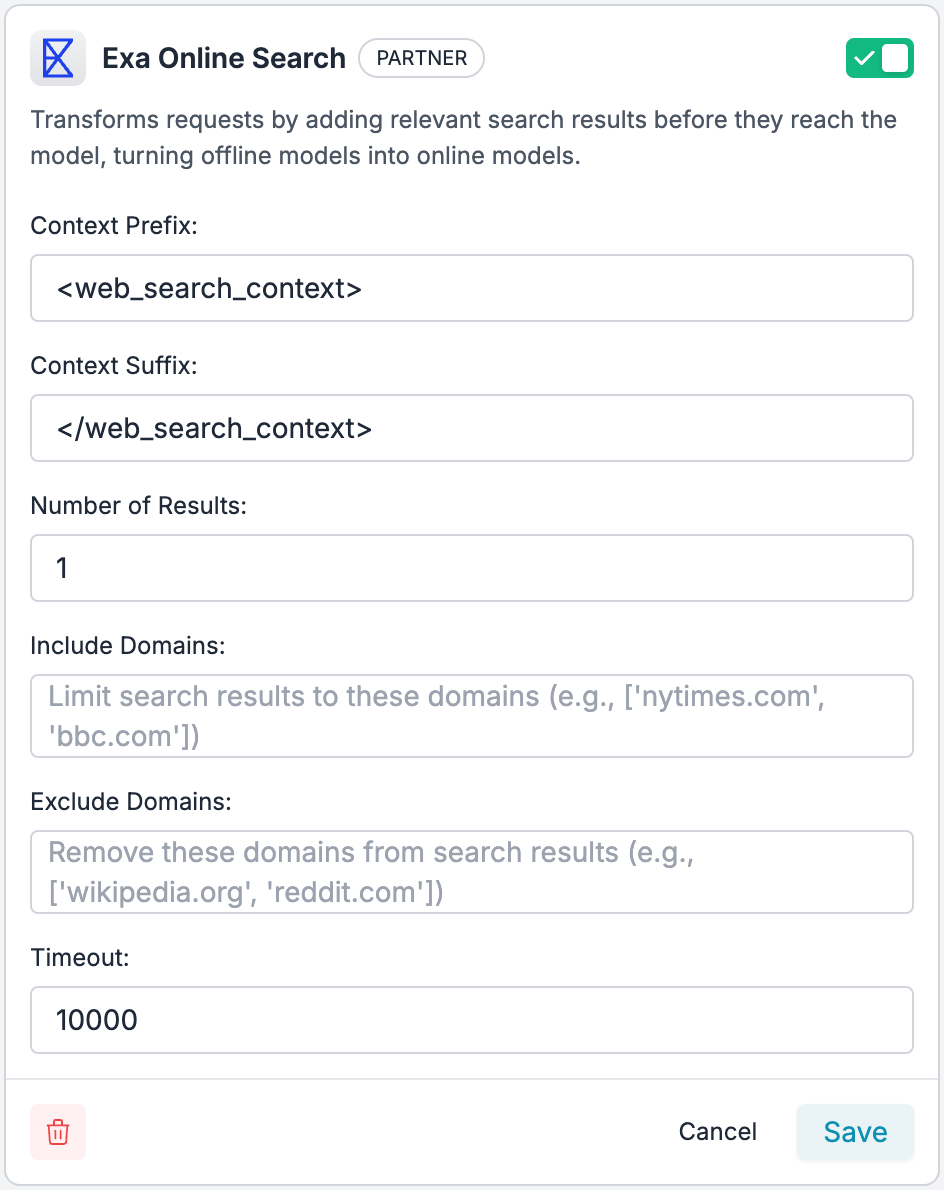
* Configure your search parameters:
* **Context Prefix**: Add Text that appears before the search results in the LLM query(default: ``)
* **Context Suffix**: Add Text that appears after the search results in the LLM query (default: ``)
* **Number of Results**: How many search results to include (recommended: 1-5)
* **Include Domains**: Optional list of specific domains to limit search results to
* **Exclude Domains**: Optional list of domains to exclude from search results
* **Timeout**: Maximum wait time for search results in milliseconds (default: 10000)
* Set any `actions` you want on your check, and create the Guardrail!
Guardrail Actions allow you to orchestrate your guardrails logic. You can learn more about them [here](/product/guardrails#there-are-6-types-of-guardrail-actions)
* Save your guardrail
 ### 3. Add Guardrail ID to a Config
* When you save a guardrail, you'll get an associated Guardrail ID
* Add this ID to the `input_guardrails` parameter in your Portkey Config.
* Create these Configs in Portkey UI, save them, and get an associated Config ID to attach to your requests. [More here](/product/ai-gateway/configs).
```json theme={null}
{
"input_guardrails": [
"your_exa_guardrail_id"
]
}
```
* Save this config and note its Config ID for use in your requests
The Exa Plugin is supported only as an `input guardrail`. It adds web search results to your request before it reaches the LLM, which is why only `before_request_hooks` are supported and not `after_request_hooks` on Portkey's gateway. [Learn more about guardrails here](/product/guardrails)
### 4. Use the Config in Your Requests
```js theme={null}
const portkey = new Portkey({
apiKey: "PORTKEY_API_KEY",
config: "pc-***" // Your config ID with Exa enabled
});
// Any request using this client will now have Exa search capabilities
const response = await portkey.chat.completions.create({
model: "gpt-4",
messages: [
{ role: "user", content: "What are the latest developments in quantum computing?" }
]
});
```
```py theme={null}
portkey = Portkey(
api_key="PORTKEY_API_KEY",
config="pc-***" # Your config ID with Exa enabled
)
# Any request using this client will now have Exa search capabilities
response = portkey.chat.completions.create(
model="gpt-4",
messages=[
{"role": "user", "content": "What are the latest developments in quantum computing?"}
]
)
```
```js theme={null}
const openai = new OpenAI({
apiKey: 'OPENAI_API_KEY',
baseURL: PORTKEY_GATEWAY_URL,
defaultHeaders: createHeaders({
apiKey: "PORTKEY_API_KEY",
config: "CONFIG_ID_WITH_EXA" // Your config with Exa enabled
})
});
// Any request using this client will now have Exa search capabilities
const response = await openai.chat.completions.create({
model: "gpt-4",
messages: [
{ role: "user", content: "What happened in the world today?" }
]
});
```
## Best Practices
1. **Combine with Output Guardrails**: Pair Exa with output validation guardrails to ensure not just up-to-date information, but also accurate formatting and content safety.
2. **Manage Token Usage**: Be mindful that adding search context increases token consumption. Monitor usage patterns and adjust the number of search results accordingly.
3. **Use Domain Filtering**: For specialized applications, use domain filtering to ensure information comes from authoritative sources relevant to your use case.
4. **Test Thoroughly**: Different models may respond differently to the added context. Test your configuration across various query types and models.
## Monitoring and Logs
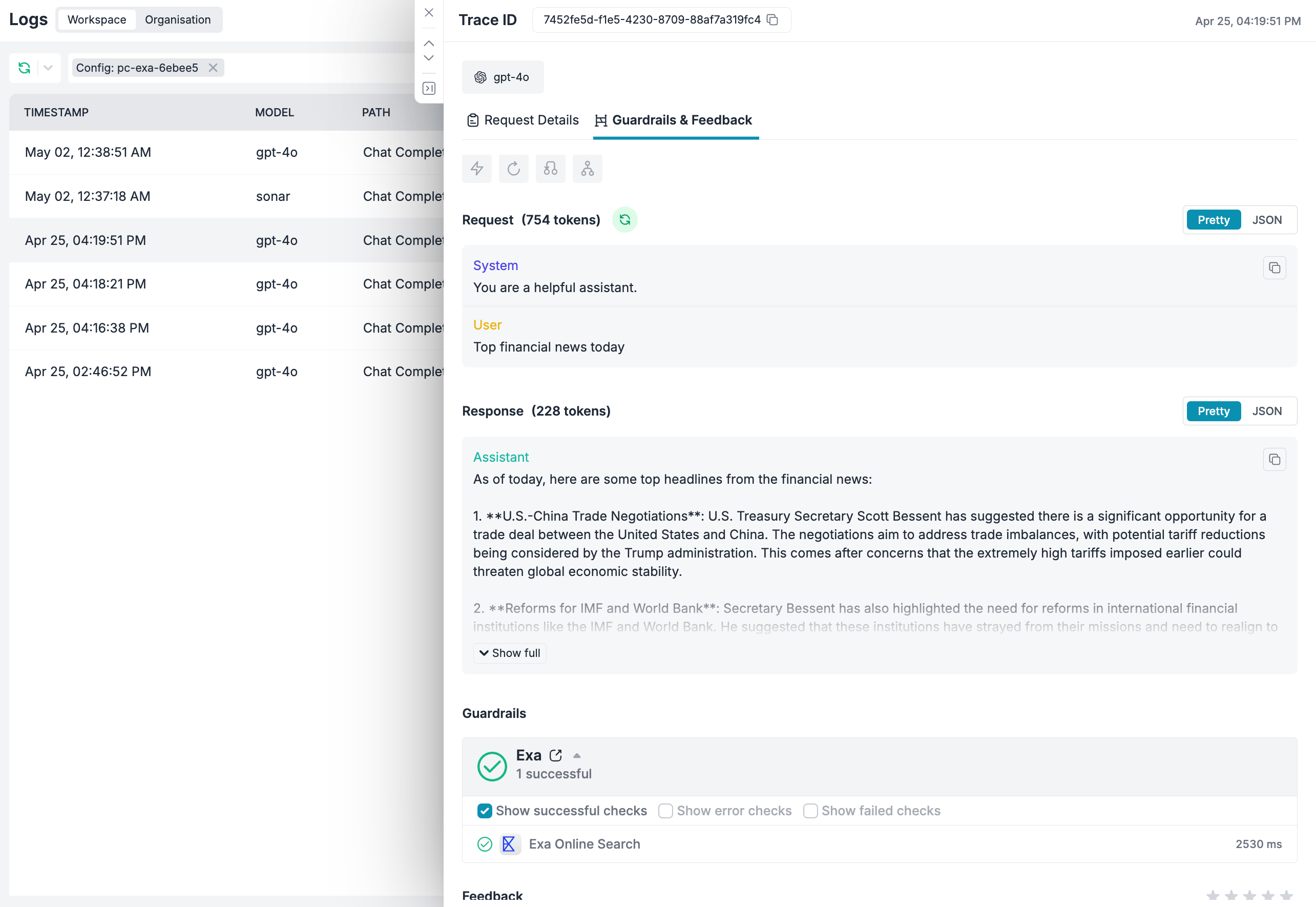
All Exa-enhanced requests are logged in the Portkey dashboard. You can review:
* Which requests used Exa search
* How many tokens were used for the search context
* How the search results affected the model's response
### 3. Add Guardrail ID to a Config
* When you save a guardrail, you'll get an associated Guardrail ID
* Add this ID to the `input_guardrails` parameter in your Portkey Config.
* Create these Configs in Portkey UI, save them, and get an associated Config ID to attach to your requests. [More here](/product/ai-gateway/configs).
```json theme={null}
{
"input_guardrails": [
"your_exa_guardrail_id"
]
}
```
* Save this config and note its Config ID for use in your requests
The Exa Plugin is supported only as an `input guardrail`. It adds web search results to your request before it reaches the LLM, which is why only `before_request_hooks` are supported and not `after_request_hooks` on Portkey's gateway. [Learn more about guardrails here](/product/guardrails)
### 4. Use the Config in Your Requests
```js theme={null}
const portkey = new Portkey({
apiKey: "PORTKEY_API_KEY",
config: "pc-***" // Your config ID with Exa enabled
});
// Any request using this client will now have Exa search capabilities
const response = await portkey.chat.completions.create({
model: "gpt-4",
messages: [
{ role: "user", content: "What are the latest developments in quantum computing?" }
]
});
```
```py theme={null}
portkey = Portkey(
api_key="PORTKEY_API_KEY",
config="pc-***" # Your config ID with Exa enabled
)
# Any request using this client will now have Exa search capabilities
response = portkey.chat.completions.create(
model="gpt-4",
messages=[
{"role": "user", "content": "What are the latest developments in quantum computing?"}
]
)
```
```js theme={null}
const openai = new OpenAI({
apiKey: 'OPENAI_API_KEY',
baseURL: PORTKEY_GATEWAY_URL,
defaultHeaders: createHeaders({
apiKey: "PORTKEY_API_KEY",
config: "CONFIG_ID_WITH_EXA" // Your config with Exa enabled
})
});
// Any request using this client will now have Exa search capabilities
const response = await openai.chat.completions.create({
model: "gpt-4",
messages: [
{ role: "user", content: "What happened in the world today?" }
]
});
```
## Best Practices
1. **Combine with Output Guardrails**: Pair Exa with output validation guardrails to ensure not just up-to-date information, but also accurate formatting and content safety.
2. **Manage Token Usage**: Be mindful that adding search context increases token consumption. Monitor usage patterns and adjust the number of search results accordingly.
3. **Use Domain Filtering**: For specialized applications, use domain filtering to ensure information comes from authoritative sources relevant to your use case.
4. **Test Thoroughly**: Different models may respond differently to the added context. Test your configuration across various query types and models.
## Monitoring and Logs
All Exa-enhanced requests are logged in the Portkey dashboard. You can review:
* Which requests used Exa search
* How many tokens were used for the search context
* How the search results affected the model's response
 ## Frequently Asked Questions
Yes, the Exa Online Search plugin works with any LLM provider supported by Portkey, including OpenAI, Anthropic, Cohere, and more. The plugin adds context before your prompt reaches the model, so it's model-agnostic.
Adding search results as context will increase token usage since the prompt becomes longer. The exact increase depends on the number of search results and their length. You can control this by adjusting the "Number of Results" parameter.
Exa provides real-time search results from across the web, with freshness depending on how quickly content is indexed. For most major news and information sources, content is available within minutes to hours of publication.
Unlike OpenAI's browsing capability which is limited to specific models and the OpenAI ecosystem, Exa Online Search works with any LLM provider and model available through Portkey, giving you more flexibility and control.
## Get Support
If you face any issues with the Exa integration, reach out to the Portkey team on the [community forum](https://discord.gg/portkey-llms-in-prod-1143393887742861333).
## Learn More
* [Exa API Documentation](https://exa.ai/docs)
* [Portkey Guardrails Overview](/product/guardrails)
```
```
## Frequently Asked Questions
Yes, the Exa Online Search plugin works with any LLM provider supported by Portkey, including OpenAI, Anthropic, Cohere, and more. The plugin adds context before your prompt reaches the model, so it's model-agnostic.
Adding search results as context will increase token usage since the prompt becomes longer. The exact increase depends on the number of search results and their length. You can control this by adjusting the "Number of Results" parameter.
Exa provides real-time search results from across the web, with freshness depending on how quickly content is indexed. For most major news and information sources, content is available within minutes to hours of publication.
Unlike OpenAI's browsing capability which is limited to specific models and the OpenAI ecosystem, Exa Online Search works with any LLM provider and model available through Portkey, giving you more flexibility and control.
## Get Support
If you face any issues with the Exa integration, reach out to the Portkey team on the [community forum](https://discord.gg/portkey-llms-in-prod-1143393887742861333).
## Learn More
* [Exa API Documentation](https://exa.ai/docs)
* [Portkey Guardrails Overview](/product/guardrails)
```
```