> ## Documentation Index
> Fetch the complete documentation index at: https://portkey-docs-add-third-party-integration-issues-fixes.mintlify.site/llms.txt
> Use this file to discover all available pages before exploring further.
# Langchain (JS/TS)
> Add Portkey's enterprise features to any Langchain app—observability, reliability, caching, and cost control.
This guide covers Langchain **JavaScript/TypeScript**. For Python, see [Langchain Python](/integrations/libraries/langchain-python).
Langchain provides a unified interface for building LLM applications. Add Portkey to get production-grade features: full observability, automatic fallbacks, semantic caching, and cost controls—all without changing your Langchain code.
## Quick Start
Add Portkey to any Langchain app with 3 parameters:
```javascript theme={null}
import { ChatOpenAI } from "@langchain/openai";
const model = new ChatOpenAI({
model: "@openai-prod/gpt-4o", // Provider slug from Model Catalog
configuration: {
baseURL: "https://api.portkey.ai/v1"
},
apiKey: "PORTKEY_API_KEY" // Your Portkey API key
});
const response = await model.invoke("Tell me a joke");
console.log(response.content);
```
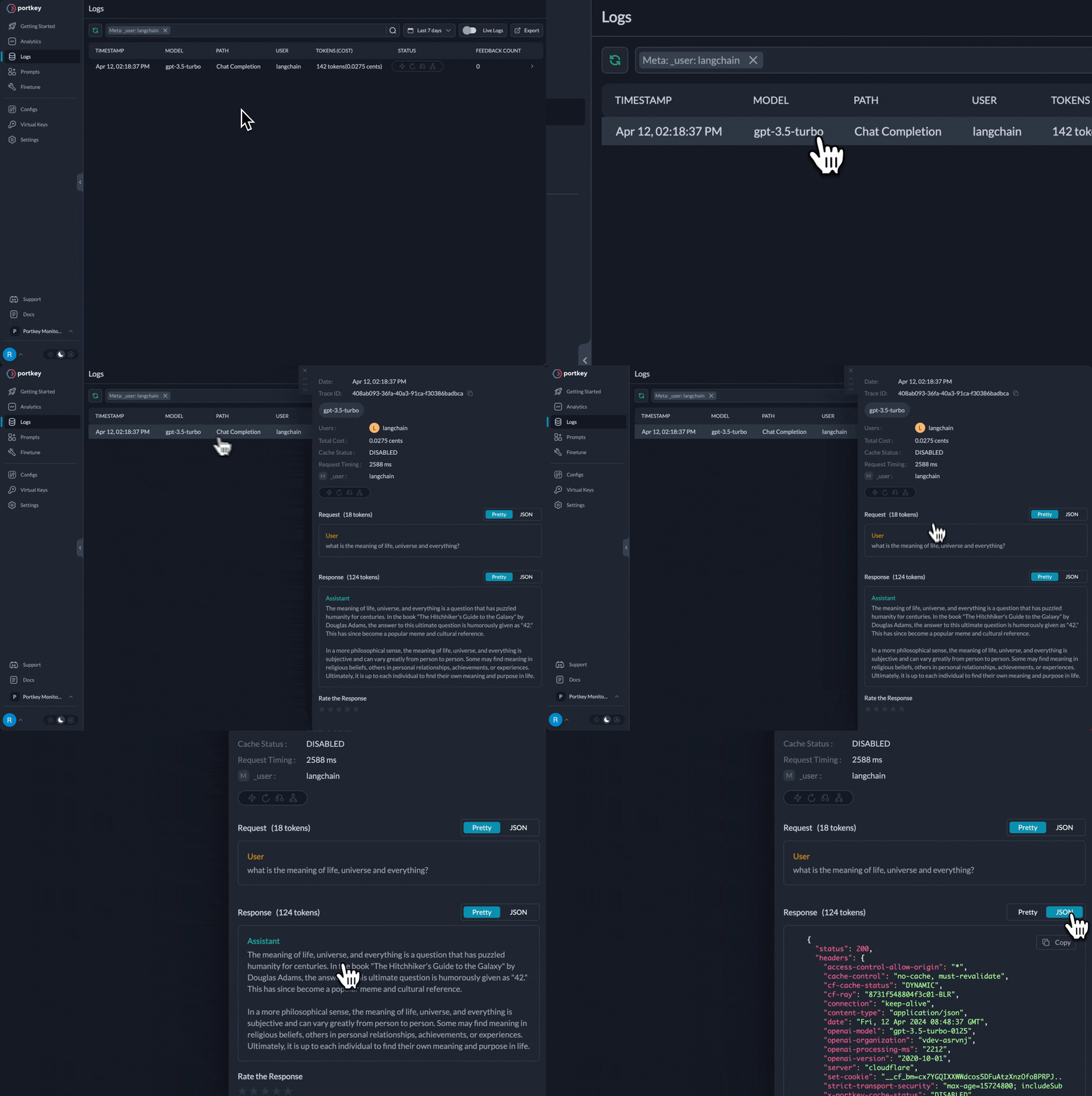 That's it! You now get:
* ✅ Full observability (costs, latency, logs)
* ✅ Dynamic model selection per request
* ✅ Automatic fallbacks and retries (via configs)
* ✅ Budget controls per team/project
## Why Add Portkey to Langchain?
Langchain handles application orchestration. Portkey adds production features:
Every request logged with costs, latency, tokens. Team-level analytics and debugging.
Switch models per request. Route simple queries to cheap models, complex to advanced—automatically tracked.
Automatic fallbacks, smart retries, load balancing—configured once, works everywhere.
Budget limits per team/project. Rate limiting. Centralized credential management.
## Setup
### 1. Install Packages
```bash theme={null}
npm install @langchain/openai portkey-ai
```
### 2. Add Provider in Model Catalog
1. Go to [**Model Catalog → Add Provider**](https://app.portkey.ai/model-catalog/providers)
2. Select your provider (OpenAI, Anthropic, Google, etc.)
3. Choose existing credentials or create new by entering your API keys
4. Name your provider (e.g., `openai-prod`)
Your provider slug will be **`@openai-prod`** (or whatever you named it).
Set up budgets, rate limits, and manage credentials
### 3. Get Portkey API Key
Create your Portkey API key at [app.portkey.ai/api-keys](https://app.portkey.ai/api-keys)
### 4. Use in Your Code
Replace your existing `ChatOpenAI` initialization:
```javascript theme={null}
// Before (direct to OpenAI)
const model = new ChatOpenAI({
model: "gpt-4o",
apiKey: "OPENAI_API_KEY"
});
// After (via Portkey)
const model = new ChatOpenAI({
model: "@openai-prod/gpt-4o",
configuration: {
baseURL: "https://api.portkey.ai/v1"
},
apiKey: "PORTKEY_API_KEY"
});
```
**That's the only change needed!** All your existing Langchain code (agents, chains, LCEL, etc.) works exactly the same.
## Switching Between Providers
Just change the model string—everything else stays the same:
```javascript theme={null}
// OpenAI
const openaiModel = new ChatOpenAI({
model: "@openai-prod/gpt-4o",
configuration: { baseURL: "https://api.portkey.ai/v1" },
apiKey: "PORTKEY_API_KEY"
});
// Anthropic
const anthropicModel = new ChatOpenAI({
model: "@anthropic-prod/claude-sonnet-4",
configuration: { baseURL: "https://api.portkey.ai/v1" },
apiKey: "PORTKEY_API_KEY"
});
// Google Gemini
const geminiModel = new ChatOpenAI({
model: "@google-prod/gemini-2.0-flash",
configuration: { baseURL: "https://api.portkey.ai/v1" },
apiKey: "PORTKEY_API_KEY"
});
```
Portkey implements OpenAI-compatible APIs for all providers, so you always use `ChatOpenAI` regardless of which model you're calling.
## Using with Langchain Agents
Langchain agents are the primary use case. Portkey works seamlessly with agent workflows:
```javascript theme={null}
import { ChatOpenAI } from "@langchain/openai";
import { tool } from "@langchain/core/tools";
import { createReactAgent } from "@langchain/langgraph/prebuilt";
import { z } from "zod";
// Define tools
const searchTool = tool(
async ({ query }) => `Results for: ${query}`,
{
name: "search",
description: "Search for information",
schema: z.object({ query: z.string() })
}
);
const weatherTool = tool(
async ({ location }) => `Weather in ${location}: Sunny, 72°F`,
{
name: "get_weather",
description: "Get weather for a location",
schema: z.object({ location: z.string() })
}
);
// Create model with Portkey
const model = new ChatOpenAI({
model: "@openai-prod/gpt-4o",
configuration: { baseURL: "https://api.portkey.ai/v1" },
apiKey: "PORTKEY_API_KEY"
});
// Create agent
const agent = createReactAgent({
llm: model,
tools: [searchTool, weatherTool]
});
// Run agent
const result = await agent.invoke({
messages: [{ role: "user", content: "What's the weather in NYC?" }]
});
```
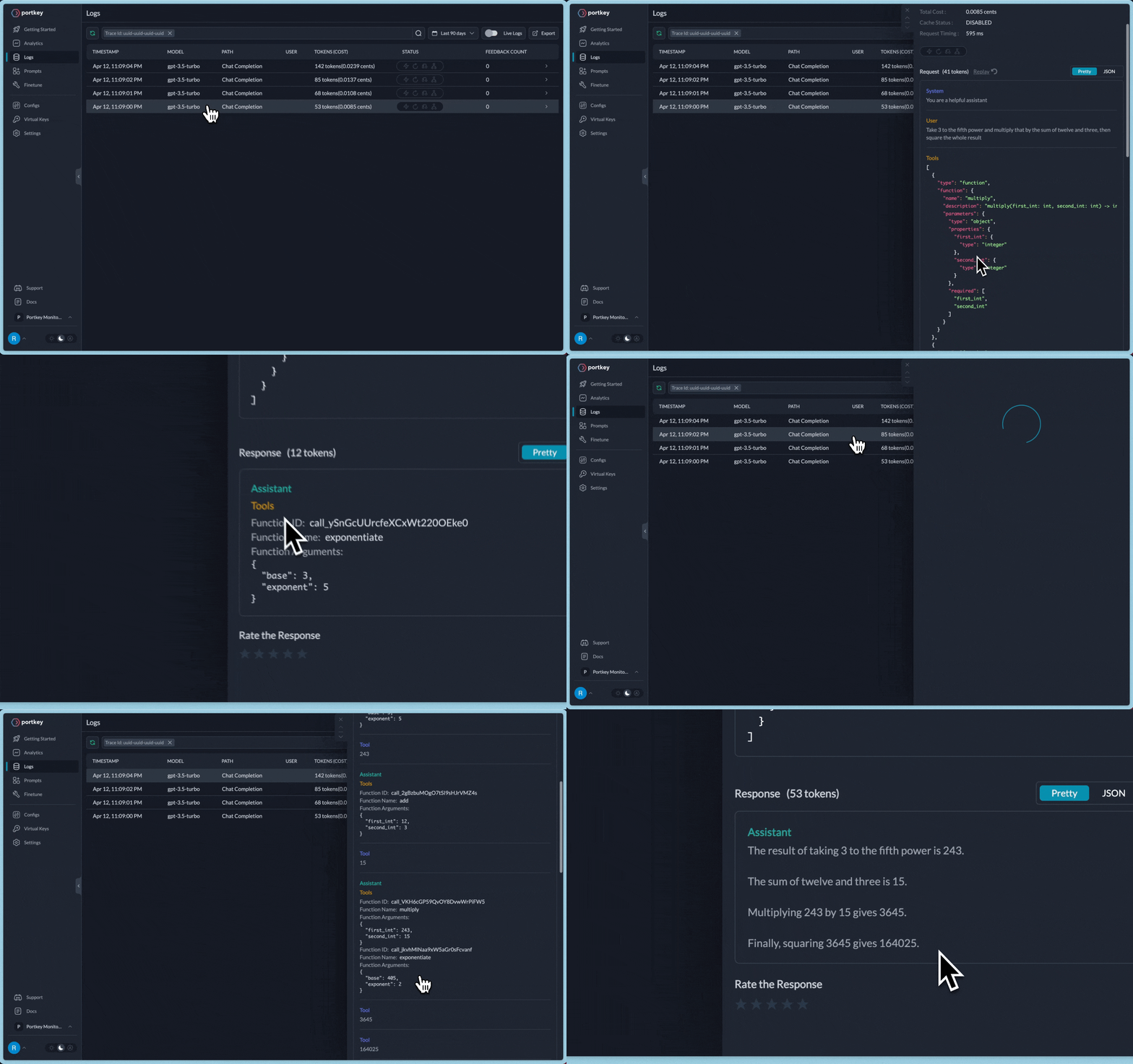
Every agent step is logged in Portkey:
* Model calls with prompts and responses
* Tool executions with inputs and outputs
* Full trace of the agent's reasoning
* Costs and latency for each step
That's it! You now get:
* ✅ Full observability (costs, latency, logs)
* ✅ Dynamic model selection per request
* ✅ Automatic fallbacks and retries (via configs)
* ✅ Budget controls per team/project
## Why Add Portkey to Langchain?
Langchain handles application orchestration. Portkey adds production features:
Every request logged with costs, latency, tokens. Team-level analytics and debugging.
Switch models per request. Route simple queries to cheap models, complex to advanced—automatically tracked.
Automatic fallbacks, smart retries, load balancing—configured once, works everywhere.
Budget limits per team/project. Rate limiting. Centralized credential management.
## Setup
### 1. Install Packages
```bash theme={null}
npm install @langchain/openai portkey-ai
```
### 2. Add Provider in Model Catalog
1. Go to [**Model Catalog → Add Provider**](https://app.portkey.ai/model-catalog/providers)
2. Select your provider (OpenAI, Anthropic, Google, etc.)
3. Choose existing credentials or create new by entering your API keys
4. Name your provider (e.g., `openai-prod`)
Your provider slug will be **`@openai-prod`** (or whatever you named it).
Set up budgets, rate limits, and manage credentials
### 3. Get Portkey API Key
Create your Portkey API key at [app.portkey.ai/api-keys](https://app.portkey.ai/api-keys)
### 4. Use in Your Code
Replace your existing `ChatOpenAI` initialization:
```javascript theme={null}
// Before (direct to OpenAI)
const model = new ChatOpenAI({
model: "gpt-4o",
apiKey: "OPENAI_API_KEY"
});
// After (via Portkey)
const model = new ChatOpenAI({
model: "@openai-prod/gpt-4o",
configuration: {
baseURL: "https://api.portkey.ai/v1"
},
apiKey: "PORTKEY_API_KEY"
});
```
**That's the only change needed!** All your existing Langchain code (agents, chains, LCEL, etc.) works exactly the same.
## Switching Between Providers
Just change the model string—everything else stays the same:
```javascript theme={null}
// OpenAI
const openaiModel = new ChatOpenAI({
model: "@openai-prod/gpt-4o",
configuration: { baseURL: "https://api.portkey.ai/v1" },
apiKey: "PORTKEY_API_KEY"
});
// Anthropic
const anthropicModel = new ChatOpenAI({
model: "@anthropic-prod/claude-sonnet-4",
configuration: { baseURL: "https://api.portkey.ai/v1" },
apiKey: "PORTKEY_API_KEY"
});
// Google Gemini
const geminiModel = new ChatOpenAI({
model: "@google-prod/gemini-2.0-flash",
configuration: { baseURL: "https://api.portkey.ai/v1" },
apiKey: "PORTKEY_API_KEY"
});
```
Portkey implements OpenAI-compatible APIs for all providers, so you always use `ChatOpenAI` regardless of which model you're calling.
## Using with Langchain Agents
Langchain agents are the primary use case. Portkey works seamlessly with agent workflows:
```javascript theme={null}
import { ChatOpenAI } from "@langchain/openai";
import { tool } from "@langchain/core/tools";
import { createReactAgent } from "@langchain/langgraph/prebuilt";
import { z } from "zod";
// Define tools
const searchTool = tool(
async ({ query }) => `Results for: ${query}`,
{
name: "search",
description: "Search for information",
schema: z.object({ query: z.string() })
}
);
const weatherTool = tool(
async ({ location }) => `Weather in ${location}: Sunny, 72°F`,
{
name: "get_weather",
description: "Get weather for a location",
schema: z.object({ location: z.string() })
}
);
// Create model with Portkey
const model = new ChatOpenAI({
model: "@openai-prod/gpt-4o",
configuration: { baseURL: "https://api.portkey.ai/v1" },
apiKey: "PORTKEY_API_KEY"
});
// Create agent
const agent = createReactAgent({
llm: model,
tools: [searchTool, weatherTool]
});
// Run agent
const result = await agent.invoke({
messages: [{ role: "user", content: "What's the weather in NYC?" }]
});
```
Every agent step is logged in Portkey:
* Model calls with prompts and responses
* Tool executions with inputs and outputs
* Full trace of the agent's reasoning
* Costs and latency for each step
 ## Works With All Langchain Features
✅ **Agents** - Full compatibility with LangGraph agents\
✅ **LCEL** - LangChain Expression Language\
✅ **Chains** - All chain types supported\
✅ **Streaming** - Token-by-token streaming\
✅ **Tool Calling** - Function/tool calling\
✅ **LangGraph** - Complex workflows
### Streaming
```javascript theme={null}
const model = new ChatOpenAI({
model: "@openai-prod/gpt-4o",
configuration: { baseURL: "https://api.portkey.ai/v1" },
apiKey: "PORTKEY_API_KEY",
streaming: true
});
const stream = await model.stream("Write a short story");
for await (const chunk of stream) {
process.stdout.write(chunk.content);
}
```
### Chains & Prompts
```javascript theme={null}
import { ChatOpenAI } from "@langchain/openai";
import { ChatPromptTemplate } from "@langchain/core/prompts";
const model = new ChatOpenAI({
model: "@openai-prod/gpt-4o",
configuration: { baseURL: "https://api.portkey.ai/v1" },
apiKey: "PORTKEY_API_KEY"
});
const prompt = ChatPromptTemplate.fromMessages([
["human", "Tell me a short joke about {topic}"]
]);
const chain = prompt.pipe(model);
const response = await chain.invoke({ topic: "ice cream" });
console.log(response.content);
```
### Tool Calling
```javascript theme={null}
import { ChatOpenAI } from "@langchain/openai";
import { z } from "zod";
import { tool } from "@langchain/core/tools";
const getWeather = tool(
async ({ location }) => `Weather in ${location}: Sunny, 72°F`,
{
name: "get_weather",
description: "Get current weather in a location",
schema: z.object({
location: z.string().describe("City and state, e.g. San Francisco, CA")
})
}
);
const model = new ChatOpenAI({
model: "@openai-prod/gpt-4o",
configuration: { baseURL: "https://api.portkey.ai/v1" },
apiKey: "PORTKEY_API_KEY"
});
const modelWithTools = model.bindTools([getWeather]);
const response = await modelWithTools.invoke("What's the weather in NYC?");
console.log(response.tool_calls);
```
## Dynamic Model Selection
For dynamic model routing based on query complexity or task type, use **Portkey Configs** with conditional routing:
```javascript theme={null}
import { ChatOpenAI } from "@langchain/openai";
import { createHeaders } from "portkey-ai";
// Define routing config (created in Portkey dashboard)
const config = {
strategy: {
mode: "conditional",
conditions: [
{
query: { "metadata.complexity": { "$eq": "simple" } },
then: "cheap-model"
},
{
query: { "metadata.complexity": { "$eq": "complex" } },
then: "advanced-model"
}
],
default: "cheap-model"
},
targets: [
{
name: "cheap-model",
override_params: { model: "@openai-prod/gpt-4o-mini" }
},
{
name: "advanced-model",
override_params: { model: "@openai-prod/o1" }
}
]
};
const model = new ChatOpenAI({
model: "gpt-4o",
configuration: {
baseURL: "https://api.portkey.ai/v1",
defaultHeaders: createHeaders({ config })
},
apiKey: "PORTKEY_API_KEY"
});
// Route to cheap model
const response1 = await model.invoke("What is 2+2?", {
metadata: { complexity: "simple" }
});
// Route to advanced model
const response2 = await model.invoke("Solve this differential equation...", {
metadata: { complexity: "complex" }
});
```
All routing decisions are tracked in Portkey with full observability—see which models were used, costs per model, and performance comparisons.
Learn more about conditional routing and advanced patterns
## Advanced Features via Configs
For production features like fallbacks, caching, and load balancing, use Portkey Configs:
```javascript theme={null}
import { ChatOpenAI } from "@langchain/openai";
import { createHeaders } from "portkey-ai";
const model = new ChatOpenAI({
model: "@openai-prod/gpt-4o",
configuration: {
baseURL: "https://api.portkey.ai/v1",
defaultHeaders: createHeaders({
config: "pc_your_config_id" // Created in Portkey dashboard
})
},
apiKey: "PORTKEY_API_KEY"
});
```
### Example: Load Balancing
```javascript theme={null}
const config = {
strategy: { mode: "loadbalance" },
targets: [
{
override_params: { model: "@openai-prod/gpt-4o" },
weight: 0.5
},
{
override_params: { model: "@anthropic-prod/claude-sonnet-4" },
weight: 0.5
}
]
};
const model = new ChatOpenAI({
model: "gpt-4o",
configuration: {
baseURL: "https://api.portkey.ai/v1",
defaultHeaders: createHeaders({ config })
},
apiKey: "PORTKEY_API_KEY"
});
// Requests are distributed 50/50 between OpenAI and Anthropic
const response = await model.invoke("Hello!");
```
Set up fallbacks, retries, caching, load balancing, and more
## Embeddings
Create embeddings via Portkey:
```javascript theme={null}
import { OpenAIEmbeddings } from "@langchain/openai";
const embeddings = new OpenAIEmbeddings({
model: "text-embedding-3-small",
configuration: {
baseURL: "https://api.portkey.ai/v1",
defaultHeaders: { "x-portkey-provider": "@openai-prod" }
},
apiKey: "PORTKEY_API_KEY"
});
const vectors = await embeddings.embedDocuments(["Hello world", "Goodbye world"]);
console.log(vectors);
```
Portkey supports OpenAI embeddings via `OpenAIEmbeddings`. For other providers (Cohere, Voyage), use the **Portkey SDK directly** ([docs](/api-reference/inference-api/embeddings)).
## Migration from Direct OpenAI
Already using Langchain with OpenAI? Just update 3 parameters:
```javascript theme={null}
// Before
import { ChatOpenAI } from "@langchain/openai";
const model = new ChatOpenAI({
model: "gpt-4o",
apiKey: process.env.OPENAI_API_KEY,
temperature: 0.7
});
// After (add configuration, change model and apiKey)
const model = new ChatOpenAI({
model: "@openai-prod/gpt-4o", // Add provider slug
configuration: {
baseURL: "https://api.portkey.ai/v1" // Add this
},
apiKey: "PORTKEY_API_KEY", // Change to Portkey key
temperature: 0.7 // Keep existing params
});
```
**Benefits:**
* Zero code changes to your existing Langchain logic
* Instant observability for all requests
* Production-grade reliability features
* Cost controls and budgets
## Next Steps
Set up providers, budgets, and access control
Configure fallbacks, caching, and routing
Track costs, performance, and usage
Add PII detection and content filtering
For complete SDK documentation:
Complete Portkey SDK documentation
## Works With All Langchain Features
✅ **Agents** - Full compatibility with LangGraph agents\
✅ **LCEL** - LangChain Expression Language\
✅ **Chains** - All chain types supported\
✅ **Streaming** - Token-by-token streaming\
✅ **Tool Calling** - Function/tool calling\
✅ **LangGraph** - Complex workflows
### Streaming
```javascript theme={null}
const model = new ChatOpenAI({
model: "@openai-prod/gpt-4o",
configuration: { baseURL: "https://api.portkey.ai/v1" },
apiKey: "PORTKEY_API_KEY",
streaming: true
});
const stream = await model.stream("Write a short story");
for await (const chunk of stream) {
process.stdout.write(chunk.content);
}
```
### Chains & Prompts
```javascript theme={null}
import { ChatOpenAI } from "@langchain/openai";
import { ChatPromptTemplate } from "@langchain/core/prompts";
const model = new ChatOpenAI({
model: "@openai-prod/gpt-4o",
configuration: { baseURL: "https://api.portkey.ai/v1" },
apiKey: "PORTKEY_API_KEY"
});
const prompt = ChatPromptTemplate.fromMessages([
["human", "Tell me a short joke about {topic}"]
]);
const chain = prompt.pipe(model);
const response = await chain.invoke({ topic: "ice cream" });
console.log(response.content);
```
### Tool Calling
```javascript theme={null}
import { ChatOpenAI } from "@langchain/openai";
import { z } from "zod";
import { tool } from "@langchain/core/tools";
const getWeather = tool(
async ({ location }) => `Weather in ${location}: Sunny, 72°F`,
{
name: "get_weather",
description: "Get current weather in a location",
schema: z.object({
location: z.string().describe("City and state, e.g. San Francisco, CA")
})
}
);
const model = new ChatOpenAI({
model: "@openai-prod/gpt-4o",
configuration: { baseURL: "https://api.portkey.ai/v1" },
apiKey: "PORTKEY_API_KEY"
});
const modelWithTools = model.bindTools([getWeather]);
const response = await modelWithTools.invoke("What's the weather in NYC?");
console.log(response.tool_calls);
```
## Dynamic Model Selection
For dynamic model routing based on query complexity or task type, use **Portkey Configs** with conditional routing:
```javascript theme={null}
import { ChatOpenAI } from "@langchain/openai";
import { createHeaders } from "portkey-ai";
// Define routing config (created in Portkey dashboard)
const config = {
strategy: {
mode: "conditional",
conditions: [
{
query: { "metadata.complexity": { "$eq": "simple" } },
then: "cheap-model"
},
{
query: { "metadata.complexity": { "$eq": "complex" } },
then: "advanced-model"
}
],
default: "cheap-model"
},
targets: [
{
name: "cheap-model",
override_params: { model: "@openai-prod/gpt-4o-mini" }
},
{
name: "advanced-model",
override_params: { model: "@openai-prod/o1" }
}
]
};
const model = new ChatOpenAI({
model: "gpt-4o",
configuration: {
baseURL: "https://api.portkey.ai/v1",
defaultHeaders: createHeaders({ config })
},
apiKey: "PORTKEY_API_KEY"
});
// Route to cheap model
const response1 = await model.invoke("What is 2+2?", {
metadata: { complexity: "simple" }
});
// Route to advanced model
const response2 = await model.invoke("Solve this differential equation...", {
metadata: { complexity: "complex" }
});
```
All routing decisions are tracked in Portkey with full observability—see which models were used, costs per model, and performance comparisons.
Learn more about conditional routing and advanced patterns
## Advanced Features via Configs
For production features like fallbacks, caching, and load balancing, use Portkey Configs:
```javascript theme={null}
import { ChatOpenAI } from "@langchain/openai";
import { createHeaders } from "portkey-ai";
const model = new ChatOpenAI({
model: "@openai-prod/gpt-4o",
configuration: {
baseURL: "https://api.portkey.ai/v1",
defaultHeaders: createHeaders({
config: "pc_your_config_id" // Created in Portkey dashboard
})
},
apiKey: "PORTKEY_API_KEY"
});
```
### Example: Load Balancing
```javascript theme={null}
const config = {
strategy: { mode: "loadbalance" },
targets: [
{
override_params: { model: "@openai-prod/gpt-4o" },
weight: 0.5
},
{
override_params: { model: "@anthropic-prod/claude-sonnet-4" },
weight: 0.5
}
]
};
const model = new ChatOpenAI({
model: "gpt-4o",
configuration: {
baseURL: "https://api.portkey.ai/v1",
defaultHeaders: createHeaders({ config })
},
apiKey: "PORTKEY_API_KEY"
});
// Requests are distributed 50/50 between OpenAI and Anthropic
const response = await model.invoke("Hello!");
```
Set up fallbacks, retries, caching, load balancing, and more
## Embeddings
Create embeddings via Portkey:
```javascript theme={null}
import { OpenAIEmbeddings } from "@langchain/openai";
const embeddings = new OpenAIEmbeddings({
model: "text-embedding-3-small",
configuration: {
baseURL: "https://api.portkey.ai/v1",
defaultHeaders: { "x-portkey-provider": "@openai-prod" }
},
apiKey: "PORTKEY_API_KEY"
});
const vectors = await embeddings.embedDocuments(["Hello world", "Goodbye world"]);
console.log(vectors);
```
Portkey supports OpenAI embeddings via `OpenAIEmbeddings`. For other providers (Cohere, Voyage), use the **Portkey SDK directly** ([docs](/api-reference/inference-api/embeddings)).
## Migration from Direct OpenAI
Already using Langchain with OpenAI? Just update 3 parameters:
```javascript theme={null}
// Before
import { ChatOpenAI } from "@langchain/openai";
const model = new ChatOpenAI({
model: "gpt-4o",
apiKey: process.env.OPENAI_API_KEY,
temperature: 0.7
});
// After (add configuration, change model and apiKey)
const model = new ChatOpenAI({
model: "@openai-prod/gpt-4o", // Add provider slug
configuration: {
baseURL: "https://api.portkey.ai/v1" // Add this
},
apiKey: "PORTKEY_API_KEY", // Change to Portkey key
temperature: 0.7 // Keep existing params
});
```
**Benefits:**
* Zero code changes to your existing Langchain logic
* Instant observability for all requests
* Production-grade reliability features
* Cost controls and budgets
## Next Steps
Set up providers, budgets, and access control
Configure fallbacks, caching, and routing
Track costs, performance, and usage
Add PII detection and content filtering
For complete SDK documentation:
Complete Portkey SDK documentation