> ## Documentation Index
> Fetch the complete documentation index at: https://portkey-docs-add-third-party-integration-issues-fixes.mintlify.site/llms.txt
> Use this file to discover all available pages before exploring further.
# DSPy
> Integrate DSPy with Portkey for production-ready LLM pipelines
DSPy is a framework for algorithmically optimizing language model prompts and weights.
Portkey's integration with DSPy makes your DSPy pipelines production-ready with detailed insights on costs & performance metrics for each run, and also makes your existing DSPy code work across 1600+ LLMs.
## Getting Started
### Installation
```sh theme={null}
pip install -U dspy
```
### Setting up
Portkey integrates seamlessly with DSPy's new `LM` interface, allowing you to use 1600+ LLMs with detailed cost insights. Simply configure the LM with Portkey's gateway URL and your Portkey API key.
Grab your Portkey API key from [here](https://app.portkey.ai/).
```python theme={null}
import dspy
# Set up your Portkey-enabled LM client
lm = dspy.LM(
"openai/@YOUR_PROVIDER_SLUG/MODEL_NAME",
api_key="YOUR_PORTKEY_API_KEY",
api_base="https://api.portkey.ai/v1"
)
# Configure DSPy to use the Portkey-enabled client
dspy.configure(lm=lm)
```
The model string follows the format: `openai/@PROVIDER_SLUG/MODEL_NAME` where:
* `@PROVIDER_SLUG` is your provider's slug in Portkey (found in Model Catalog)
* `MODEL_NAME` is the specific model you want to use
Example model strings:
* `openai/@openai-provider-slug/gpt-4o`
* `openai/@anthropic-provider-slug/claude-3-sonnet-20240320`
* `openai/@aws-bedrock-slug/anthropic.claude-3-sonnet-20240229-v1:0`
🎉 That's it! You're now ready to use Portkey with DSPy.
## Let's make your first Request
Here's a simple example demonstrating DSPy with Portkey integration:
 ```python theme={null}
import dspy
# Set up the Portkey-enabled client
lm = dspy.LM(
"openai/@openai-provider-slug/gpt-4o",
api_key="YOUR_PORTKEY_API_KEY",
api_base="https://api.portkey.ai/v1"
)
dspy.configure(lm=lm)
# Simple completion
response = lm("Say this is a test!", temperature=0.7)
print(response) # => ['This is a test!']
```
When you make a request using Portkey with DSPy, you can view detailed information about the request in the Portkey dashboard:
```python theme={null}
import dspy
# Set up the Portkey-enabled client
lm = dspy.LM(
"openai/@openai-provider-slug/gpt-4o",
api_key="YOUR_PORTKEY_API_KEY",
api_base="https://api.portkey.ai/v1"
)
dspy.configure(lm=lm)
# Simple completion
response = lm("Say this is a test!", temperature=0.7)
print(response) # => ['This is a test!']
```
When you make a request using Portkey with DSPy, you can view detailed information about the request in the Portkey dashboard:
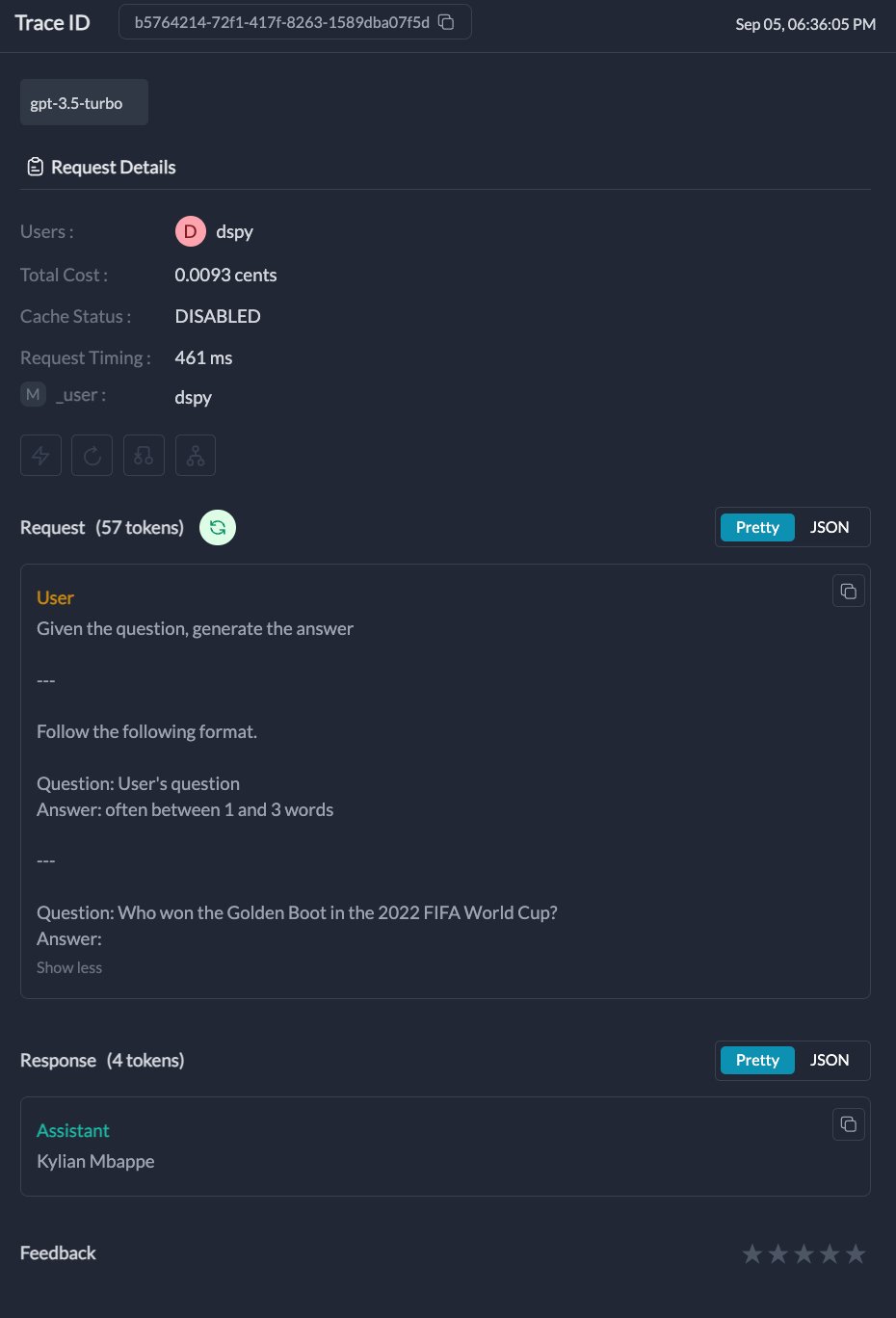 * `Request Details`: Information about the specific request, including the model used, input, and output.
* `Metrics`: Performance metrics such as latency, token usage, and cost.
* `Logs`: Detailed logs of the request, including any errors or warnings.
* `Traces`: A visual representation of the request flow, especially useful for complex DSPy modules.
## Portkey Features with DSPy
### 1. Interoperability
Portkey's Unified API enables you to easily switch between **1600+** language models. Simply change the provider slug and model name in your model string:
```python Switch between providers theme={null}
# OpenAI GPT-4
lm_openai = dspy.LM(
"openai/@openai-provider-slug/gpt-4o",
api_key="YOUR_PORTKEY_API_KEY",
api_base="https://api.portkey.ai/v1"
)
dspy.configure(lm=lm_openai)
# Anthropic Claude
lm_anthropic = dspy.LM(
"openai/@anthropic-provider-slug/claude-3-opus-20240229",
api_key="YOUR_PORTKEY_API_KEY",
api_base="https://api.portkey.ai/v1"
)
dspy.configure(lm=lm_anthropic)
# AWS Bedrock
lm_bedrock = dspy.LM(
"openai/@aws-bedrock-slug/anthropic.claude-3-sonnet-20240229-v1:0",
api_key="YOUR_PORTKEY_API_KEY",
api_base="https://api.portkey.ai/v1"
)
dspy.configure(lm=lm_bedrock)
```
### 2. Logs and Traces
Portkey provides detailed tracing for each request. This is especially useful for complex DSPy modules with multiple LLM calls. You can view these traces in the Portkey dashboard to understand the flow of your DSPy application.
* `Request Details`: Information about the specific request, including the model used, input, and output.
* `Metrics`: Performance metrics such as latency, token usage, and cost.
* `Logs`: Detailed logs of the request, including any errors or warnings.
* `Traces`: A visual representation of the request flow, especially useful for complex DSPy modules.
## Portkey Features with DSPy
### 1. Interoperability
Portkey's Unified API enables you to easily switch between **1600+** language models. Simply change the provider slug and model name in your model string:
```python Switch between providers theme={null}
# OpenAI GPT-4
lm_openai = dspy.LM(
"openai/@openai-provider-slug/gpt-4o",
api_key="YOUR_PORTKEY_API_KEY",
api_base="https://api.portkey.ai/v1"
)
dspy.configure(lm=lm_openai)
# Anthropic Claude
lm_anthropic = dspy.LM(
"openai/@anthropic-provider-slug/claude-3-opus-20240229",
api_key="YOUR_PORTKEY_API_KEY",
api_base="https://api.portkey.ai/v1"
)
dspy.configure(lm=lm_anthropic)
# AWS Bedrock
lm_bedrock = dspy.LM(
"openai/@aws-bedrock-slug/anthropic.claude-3-sonnet-20240229-v1:0",
api_key="YOUR_PORTKEY_API_KEY",
api_base="https://api.portkey.ai/v1"
)
dspy.configure(lm=lm_bedrock)
```
### 2. Logs and Traces
Portkey provides detailed tracing for each request. This is especially useful for complex DSPy modules with multiple LLM calls. You can view these traces in the Portkey dashboard to understand the flow of your DSPy application.
 ### 3. Metrics
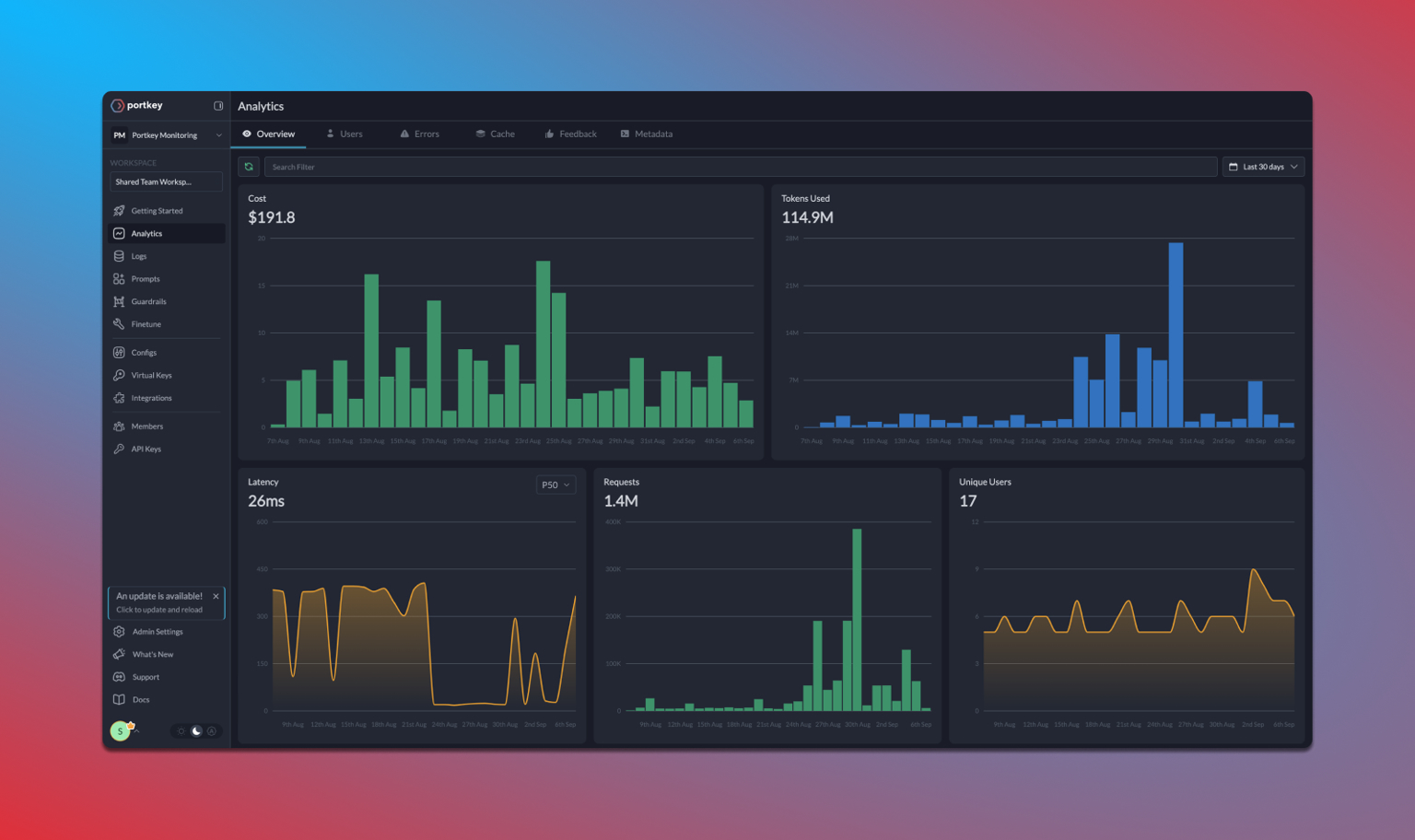
Portkey's Observability suite helps you track key metrics like **cost** and **token** usage, which is crucial for managing the high cost of DSPy operations. The observability dashboard helps you track 40+ key metrics, giving you detailed insights into your DSPy runs.
### 3. Metrics
Portkey's Observability suite helps you track key metrics like **cost** and **token** usage, which is crucial for managing the high cost of DSPy operations. The observability dashboard helps you track 40+ key metrics, giving you detailed insights into your DSPy runs.
 ### 4. Advanced Configuration
While the basic setup is simple, you can still access advanced Portkey features by configuring them in your Config or through the Portkey dashboard:
* **Caching**: Enable semantic or simple caching to reduce costs
* **Fallbacks**: Set up automatic fallbacks between providers
* **Load Balancing**: Distribute requests across multiple API keys
* **Retries**: Configure automatic retry logic
* **Rate Limiting**: Set rate limits for your API usage
These features are configured at the provider level in your Portkey dashboard, keeping your DSPy code clean and simple.
## Advanced Example: RAG with DSPy and Portkey
Here's a complete example showing how to build a RAG system with DSPy and Portkey:
```python theme={null}
import dspy
# Configure Portkey-enabled LM
lm = dspy.LM(
"openai/@openai-provider-slug/gpt-4o",
api_key="YOUR_PORTKEY_API_KEY",
api_base="https://api.portkey.ai/v1"
)
dspy.configure(lm=lm)
# Define a retrieval function
def search_wikipedia(query: str) -> list[str]:
results = dspy.ColBERTv2(url="http://20.102.90.50:2017/wiki17_abstracts")(query, k=3)
return [x["text"] for x in results]
# Create a RAG chain
rag = dspy.ChainOfThought("context, question -> response")
# Ask a question
question = "What's the name of the castle that David Gregory inherited?"
result = rag(context=search_wikipedia(question), question=question)
print(result)
# Output: Prediction(
# reasoning='David Gregory inherited Kinnairdy Castle in 1664, as mentioned in the context provided.',
# response='The name of the castle that David Gregory inherited is Kinnairdy Castle.'
# )
```
## Troubleshooting
Provider slugs can be found in your Portkey's Model Catalog. .
Always use the exact model name as specified by the provider. For example:
* OpenAI: `gpt-4o`, `gpt-3.5-turbo`
* Anthropic: `claude-3-opus-20240229`, `claude-3-sonnet-20240320`
* AWS Bedrock: `anthropic.claude-3-sonnet-20240229-v1:0`
You can also directly copy this slug from Portkey's model catalog.
DSPy uses caching for LLM calls by default, which means repeated identical requests won't generate new API calls or new traces. To ensure you capture every LLM call:
1. **Disable Caching**: For full tracing during debugging, turn off DSPy's caching
2. **Use Unique Inputs**: Make sure each run uses different inputs to avoid triggering the cache
3. **Clear the Cache**: If you need to test the same inputs again, clear DSPy's cache between runs
4. **Verify Configuration**: Confirm that your DSPy setup is correctly configured with Portkey
Remember to manage caching wisely in production to strike the right balance between thorough tracing and performance efficiency.
## Next Steps
* Explore more [LLM providers](/guides/integrations) available through Portkey
* Set up [advanced routing](/product/ai-gateway) for reliability and performance
* Configure [caching](/product/ai-gateway/cache-simple-and-semantic) to reduce costs
### 4. Advanced Configuration
While the basic setup is simple, you can still access advanced Portkey features by configuring them in your Config or through the Portkey dashboard:
* **Caching**: Enable semantic or simple caching to reduce costs
* **Fallbacks**: Set up automatic fallbacks between providers
* **Load Balancing**: Distribute requests across multiple API keys
* **Retries**: Configure automatic retry logic
* **Rate Limiting**: Set rate limits for your API usage
These features are configured at the provider level in your Portkey dashboard, keeping your DSPy code clean and simple.
## Advanced Example: RAG with DSPy and Portkey
Here's a complete example showing how to build a RAG system with DSPy and Portkey:
```python theme={null}
import dspy
# Configure Portkey-enabled LM
lm = dspy.LM(
"openai/@openai-provider-slug/gpt-4o",
api_key="YOUR_PORTKEY_API_KEY",
api_base="https://api.portkey.ai/v1"
)
dspy.configure(lm=lm)
# Define a retrieval function
def search_wikipedia(query: str) -> list[str]:
results = dspy.ColBERTv2(url="http://20.102.90.50:2017/wiki17_abstracts")(query, k=3)
return [x["text"] for x in results]
# Create a RAG chain
rag = dspy.ChainOfThought("context, question -> response")
# Ask a question
question = "What's the name of the castle that David Gregory inherited?"
result = rag(context=search_wikipedia(question), question=question)
print(result)
# Output: Prediction(
# reasoning='David Gregory inherited Kinnairdy Castle in 1664, as mentioned in the context provided.',
# response='The name of the castle that David Gregory inherited is Kinnairdy Castle.'
# )
```
## Troubleshooting
Provider slugs can be found in your Portkey's Model Catalog. .
Always use the exact model name as specified by the provider. For example:
* OpenAI: `gpt-4o`, `gpt-3.5-turbo`
* Anthropic: `claude-3-opus-20240229`, `claude-3-sonnet-20240320`
* AWS Bedrock: `anthropic.claude-3-sonnet-20240229-v1:0`
You can also directly copy this slug from Portkey's model catalog.
DSPy uses caching for LLM calls by default, which means repeated identical requests won't generate new API calls or new traces. To ensure you capture every LLM call:
1. **Disable Caching**: For full tracing during debugging, turn off DSPy's caching
2. **Use Unique Inputs**: Make sure each run uses different inputs to avoid triggering the cache
3. **Clear the Cache**: If you need to test the same inputs again, clear DSPy's cache between runs
4. **Verify Configuration**: Confirm that your DSPy setup is correctly configured with Portkey
Remember to manage caching wisely in production to strike the right balance between thorough tracing and performance efficiency.
## Next Steps
* Explore more [LLM providers](/guides/integrations) available through Portkey
* Set up [advanced routing](/product/ai-gateway) for reliability and performance
* Configure [caching](/product/ai-gateway/cache-simple-and-semantic) to reduce costs