> ## Documentation Index
> Fetch the complete documentation index at: https://portkey-docs-add-third-party-integration-issues-fixes.mintlify.site/llms.txt
> Use this file to discover all available pages before exploring further.
# Claude Desktop for Platform Admins
> Roll out Claude Desktop with Portkey across your org with provider routing, metadata-driven governance, scoped API keys, and usage observability.
You're setting up Claude Desktop so your team can use it without you worrying about runaway spend, ungoverned model access, or missing audit trails. This guide takes you through six sequential steps. Work through them once, in order, and the result is a self-serve setup for every developer in your org.
When you're done:
* Every Claude Desktop conversation routes through one governed gateway
* Spend caps and rate limits enforce automatically per team and environment
* Content guardrails apply on every request
* Developers paste a key plus a header and they're online
* You see every request, every cost, every policy decision in Portkey
```mermaid theme={null}
flowchart LR
P["1.
Providers"] --> C["2.
Configs"]
C --> G["3.
Governance"]
G --> K["4.
API Keys"]
K --> M["5.
Metadata"]
M --> O["6.
Observe"]
style P fill:#ede9fe,stroke:#7c3aed,color:#1e1b4b
style C fill:#ddd6fe,stroke:#7c3aed,color:#1e1b4b
style G fill:#c4b5fd,stroke:#7c3aed,color:#1e1b4b
style K fill:#a78bfa,stroke:#7c3aed,color:#fff
style M fill:#8b5cf6,stroke:#7c3aed,color:#fff
style O fill:#7c3aed,stroke:#7c3aed,color:#fff
```
## 1. Add provider integrations
Providers are the upstream LLM accounts Portkey calls on your behalf. Connect every model source your org uses so you can route between them later.
Go to [Model Catalog](https://app.portkey.ai/model-catalog) → **Add Provider**.
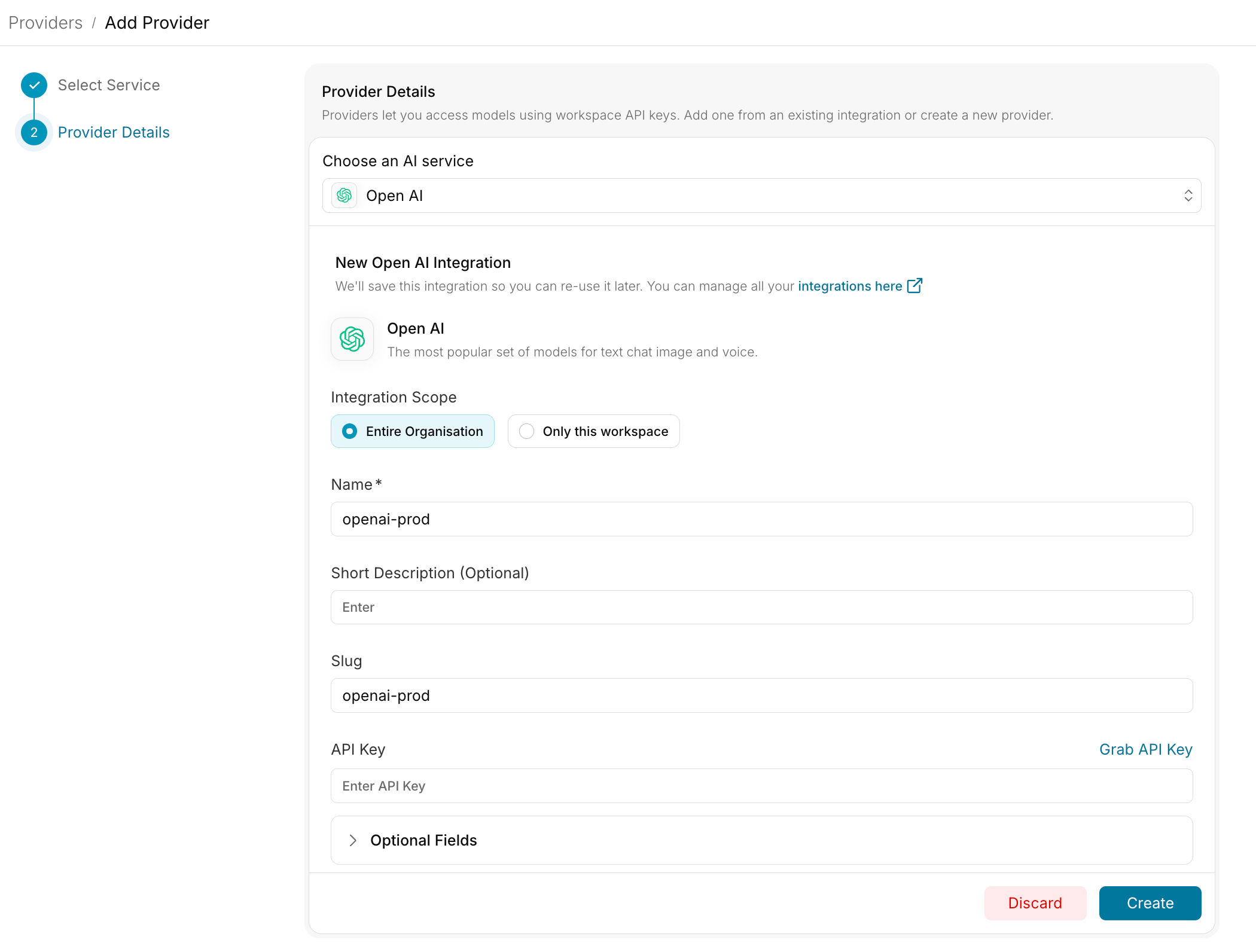 Direct API access
Cross-region inference
Google Cloud platform
## 2. Create configs
Configs are how you control which model and provider developers hit, without them changing anything in Claude Desktop. Create one config per team or environment so you can tune routing independently for each.
Naming convention: `desktop-{team}-{env}`. Examples: `desktop-eng-prod`, `desktop-support-prod`, `desktop-eng-dev`.
Go to [Configs](https://app.portkey.ai/configs) → **Create Config**:
```json theme={null}
{
"override_params": {
"model": "@anthropic-prod/claude-sonnet-4-20250514"
}
}
```
Configs also support reliability features. Open the relevant section if you need them:
Route to a backup provider if the primary is unavailable:
```json theme={null}
{
"strategy": { "mode": "fallback" },
"targets": [
{ "provider": "@anthropic-prod" },
{ "provider": "@bedrock-prod" }
]
}
```
See [Fallbacks](/product/ai-gateway/fallbacks) for details.
Distribute traffic across multiple providers or API keys:
```json theme={null}
{
"strategy": { "mode": "loadbalance" },
"targets": [
{ "provider": "@anthropic-key-1", "weight": 0.5 },
{ "provider": "@anthropic-key-2", "weight": 0.5 }
]
}
```
See [Load Balancing](/product/ai-gateway/load-balancing) for details.
Reduce cost and latency for repeated prompts:
```json theme={null}
{
"provider": "@anthropic-prod",
"cache": { "mode": "simple" }
}
```
See [Caching](/product/ai-gateway/cache-simple-and-semantic) for details.
## 3. Set up governance
Governance is the layer that prevents Claude Desktop from becoming a runaway cost or compliance problem. You apply controls at the config or workspace level, and they enforce automatically on every request.
Cap spend by team, environment, or individual user.
Protect infrastructure and ensure fair usage across teams.
Content filtering, PII detection, and custom security rules.
Start with moderate limits in a staging config. Validate that real developer workflows aren't blocked by false positives. Then tighten for production.
## 4. Create scoped API keys
API keys are what you hand to your developers. Each key inherits a config and a set of governance controls, so you can give different teams different routing and limits without explaining any of it to them.
Go to [API Keys](https://app.portkey.ai/api-keys) and create one key per team or environment.
Naming convention: `claude-desktop-{team}-{env}`. Example: `claude-desktop-eng-prod`.
Each key carries two things you've already set up:
| Attachment | Purpose |
| -------------------------------------------- | --------------------------------------------------------------------------- |
| Config (from step 2) | Controls model routing and reliability features for requests using this key |
| Budget and rate-limit controls (from step 3) | Enforces spend and usage limits per key |
Workspace scope is automatic. Every API key belongs to the workspace it was created in.
## 5. Define your metadata standard
Metadata is how Portkey knows *who* is making each request. Claude Desktop sends it as a JSON header (`x-portkey-metadata`) on every call. Portkey reads those fields and uses them for attribution, filtering, and routing decisions.
This step has two parts: pick the schema, then hand the template to your developers.
### Pick a schema
Decide which fields to track. We recommend these four:
| Field | Purpose | Example |
| -------- | ------------------------ | ------------------------ |
| `tenant` | Organization or sub-org | `acme` |
| `team` | Functional team | `engineering`, `support` |
| `user` | Individual user identity | `alice@acme.com` |
| `env` | Deployment environment | `prod`, `staging`, `dev` |
Combined into a single header value:
```json theme={null}
{"tenant":"acme","user":"alice@acme.com","team":"engineering","env":"prod"}
```
### What Portkey does with these fields
Once your schema is set, every request appears in Portkey tagged with these values. Here's what they unlock:
| Use case | How it works |
| ---------------------------------- | --------------------------------------------------------------------------------------------------- |
| **Filter Logs** | Search by any field combination (for example, all requests where `team=support` and `env=prod`) |
| **Attribute spend in Analytics** | Group cost, tokens, and latency by `team`, `tenant`, `user`, or `env` |
| **Conditional routing in configs** | Route differently based on metadata values (for example, send `env=dev` traffic to a cheaper model) |
| **Audit trail** | Every request includes `user` for compliance and security reviews |
**Trust boundary.** Metadata is a label developers send from their machine. For *authoritative* enforcement of budgets, rate limits, and model access, rely on the scoped API keys from step 4, not on metadata. Use metadata for visibility and routing. Use keys for control.
### Hand a template to developers
Send each developer this template alongside their team's API key. They paste it into Claude Desktop once and never think about it again.
| Setting | Value |
| ------------------- | ----------------------------------------------------------------------------- |
| Gateway base URL | `https://api.portkey.ai` (or your self-hosted gateway URL) |
| Gateway API key | *(team-scoped key)* |
| Gateway auth scheme | `bearer` |
| Extra header name | `x-portkey-metadata` |
| Extra header value | `{"tenant":"acme","user":"","team":"","env":"prod"}` |
Then point them to the [Developer Guide](/integrations/libraries/claude-desktop-developers).
## 6. Monitor and iterate
The work isn't done at rollout. Use Portkey to track outcomes and tune the setup based on real usage.
Verify routing decisions and policy triggers per request.
Compare spend, tokens, and latency by team, tenant, or environment.
Tune model routing and limits based on actual usage patterns.
## Pre-launch checklist
Before distributing keys to developers, run through each of these checks. Skip any one and you risk learning about the gap from a developer instead of a dashboard.
Send a test request from Claude Desktop. Confirm it shows up in [Portkey Logs](https://app.portkey.ai/logs) with all the metadata fields you defined in step 5.
Test each policy you configured: budget block, rate limit, guardrail. Confirm Portkey enforces them as expected.
Check the `model` field in the log entry. It should match what your config specifies, not whatever Anthropic's default is.
Verify spend rolls up under the correct team and user in Analytics.
Simulate a provider failure. Confirm traffic routes to your backup target without dropping requests.
## FAQ
Yes. Issue keys to one team first, validate the setup, then expand. The metadata `team` field makes it easy to spot which teams are live and which are still on the default Anthropic endpoint.
They can. Metadata is a hint that Portkey trusts. If you need authoritative attribution, scope each developer's API key narrowly so the key itself enforces team and environment.
For most rollouts: one config per team with fallbacks built in. Create separate configs only when teams have genuinely different routing needs (for example, regulated tenants on Bedrock-only).
Revoke their workspace membership in Portkey. Their API key stops working immediately. If multiple users share a key, rotate the key and re-issue to the remaining users.
Logs show the prompt content unless you've configured request redaction. For privacy-sensitive deployments, enable [PII redaction guardrails](/product/guardrails/pii-redaction) before rollout.
Direct API access
Cross-region inference
Google Cloud platform
## 2. Create configs
Configs are how you control which model and provider developers hit, without them changing anything in Claude Desktop. Create one config per team or environment so you can tune routing independently for each.
Naming convention: `desktop-{team}-{env}`. Examples: `desktop-eng-prod`, `desktop-support-prod`, `desktop-eng-dev`.
Go to [Configs](https://app.portkey.ai/configs) → **Create Config**:
```json theme={null}
{
"override_params": {
"model": "@anthropic-prod/claude-sonnet-4-20250514"
}
}
```
Configs also support reliability features. Open the relevant section if you need them:
Route to a backup provider if the primary is unavailable:
```json theme={null}
{
"strategy": { "mode": "fallback" },
"targets": [
{ "provider": "@anthropic-prod" },
{ "provider": "@bedrock-prod" }
]
}
```
See [Fallbacks](/product/ai-gateway/fallbacks) for details.
Distribute traffic across multiple providers or API keys:
```json theme={null}
{
"strategy": { "mode": "loadbalance" },
"targets": [
{ "provider": "@anthropic-key-1", "weight": 0.5 },
{ "provider": "@anthropic-key-2", "weight": 0.5 }
]
}
```
See [Load Balancing](/product/ai-gateway/load-balancing) for details.
Reduce cost and latency for repeated prompts:
```json theme={null}
{
"provider": "@anthropic-prod",
"cache": { "mode": "simple" }
}
```
See [Caching](/product/ai-gateway/cache-simple-and-semantic) for details.
## 3. Set up governance
Governance is the layer that prevents Claude Desktop from becoming a runaway cost or compliance problem. You apply controls at the config or workspace level, and they enforce automatically on every request.
Cap spend by team, environment, or individual user.
Protect infrastructure and ensure fair usage across teams.
Content filtering, PII detection, and custom security rules.
Start with moderate limits in a staging config. Validate that real developer workflows aren't blocked by false positives. Then tighten for production.
## 4. Create scoped API keys
API keys are what you hand to your developers. Each key inherits a config and a set of governance controls, so you can give different teams different routing and limits without explaining any of it to them.
Go to [API Keys](https://app.portkey.ai/api-keys) and create one key per team or environment.
Naming convention: `claude-desktop-{team}-{env}`. Example: `claude-desktop-eng-prod`.
Each key carries two things you've already set up:
| Attachment | Purpose |
| -------------------------------------------- | --------------------------------------------------------------------------- |
| Config (from step 2) | Controls model routing and reliability features for requests using this key |
| Budget and rate-limit controls (from step 3) | Enforces spend and usage limits per key |
Workspace scope is automatic. Every API key belongs to the workspace it was created in.
## 5. Define your metadata standard
Metadata is how Portkey knows *who* is making each request. Claude Desktop sends it as a JSON header (`x-portkey-metadata`) on every call. Portkey reads those fields and uses them for attribution, filtering, and routing decisions.
This step has two parts: pick the schema, then hand the template to your developers.
### Pick a schema
Decide which fields to track. We recommend these four:
| Field | Purpose | Example |
| -------- | ------------------------ | ------------------------ |
| `tenant` | Organization or sub-org | `acme` |
| `team` | Functional team | `engineering`, `support` |
| `user` | Individual user identity | `alice@acme.com` |
| `env` | Deployment environment | `prod`, `staging`, `dev` |
Combined into a single header value:
```json theme={null}
{"tenant":"acme","user":"alice@acme.com","team":"engineering","env":"prod"}
```
### What Portkey does with these fields
Once your schema is set, every request appears in Portkey tagged with these values. Here's what they unlock:
| Use case | How it works |
| ---------------------------------- | --------------------------------------------------------------------------------------------------- |
| **Filter Logs** | Search by any field combination (for example, all requests where `team=support` and `env=prod`) |
| **Attribute spend in Analytics** | Group cost, tokens, and latency by `team`, `tenant`, `user`, or `env` |
| **Conditional routing in configs** | Route differently based on metadata values (for example, send `env=dev` traffic to a cheaper model) |
| **Audit trail** | Every request includes `user` for compliance and security reviews |
**Trust boundary.** Metadata is a label developers send from their machine. For *authoritative* enforcement of budgets, rate limits, and model access, rely on the scoped API keys from step 4, not on metadata. Use metadata for visibility and routing. Use keys for control.
### Hand a template to developers
Send each developer this template alongside their team's API key. They paste it into Claude Desktop once and never think about it again.
| Setting | Value |
| ------------------- | ----------------------------------------------------------------------------- |
| Gateway base URL | `https://api.portkey.ai` (or your self-hosted gateway URL) |
| Gateway API key | *(team-scoped key)* |
| Gateway auth scheme | `bearer` |
| Extra header name | `x-portkey-metadata` |
| Extra header value | `{"tenant":"acme","user":"","team":"","env":"prod"}` |
Then point them to the [Developer Guide](/integrations/libraries/claude-desktop-developers).
## 6. Monitor and iterate
The work isn't done at rollout. Use Portkey to track outcomes and tune the setup based on real usage.
Verify routing decisions and policy triggers per request.
Compare spend, tokens, and latency by team, tenant, or environment.
Tune model routing and limits based on actual usage patterns.
## Pre-launch checklist
Before distributing keys to developers, run through each of these checks. Skip any one and you risk learning about the gap from a developer instead of a dashboard.
Send a test request from Claude Desktop. Confirm it shows up in [Portkey Logs](https://app.portkey.ai/logs) with all the metadata fields you defined in step 5.
Test each policy you configured: budget block, rate limit, guardrail. Confirm Portkey enforces them as expected.
Check the `model` field in the log entry. It should match what your config specifies, not whatever Anthropic's default is.
Verify spend rolls up under the correct team and user in Analytics.
Simulate a provider failure. Confirm traffic routes to your backup target without dropping requests.
## FAQ
Yes. Issue keys to one team first, validate the setup, then expand. The metadata `team` field makes it easy to spot which teams are live and which are still on the default Anthropic endpoint.
They can. Metadata is a hint that Portkey trusts. If you need authoritative attribution, scope each developer's API key narrowly so the key itself enforces team and environment.
For most rollouts: one config per team with fallbacks built in. Create separate configs only when teams have genuinely different routing needs (for example, regulated tenants on Bedrock-only).
Revoke their workspace membership in Portkey. Their API key stops working immediately. If multiple users share a key, rotate the key and re-issue to the remaining users.
Logs show the prompt content unless you've configured request redaction. For privacy-sensitive deployments, enable [PII redaction guardrails](/product/guardrails/pii-redaction) before rollout.