> ## Documentation Index
> Fetch the complete documentation index at: https://portkey-docs-add-third-party-integration-issues-fixes.mintlify.site/llms.txt
> Use this file to discover all available pages before exploring further.
# Autogen (DEPRECATED)
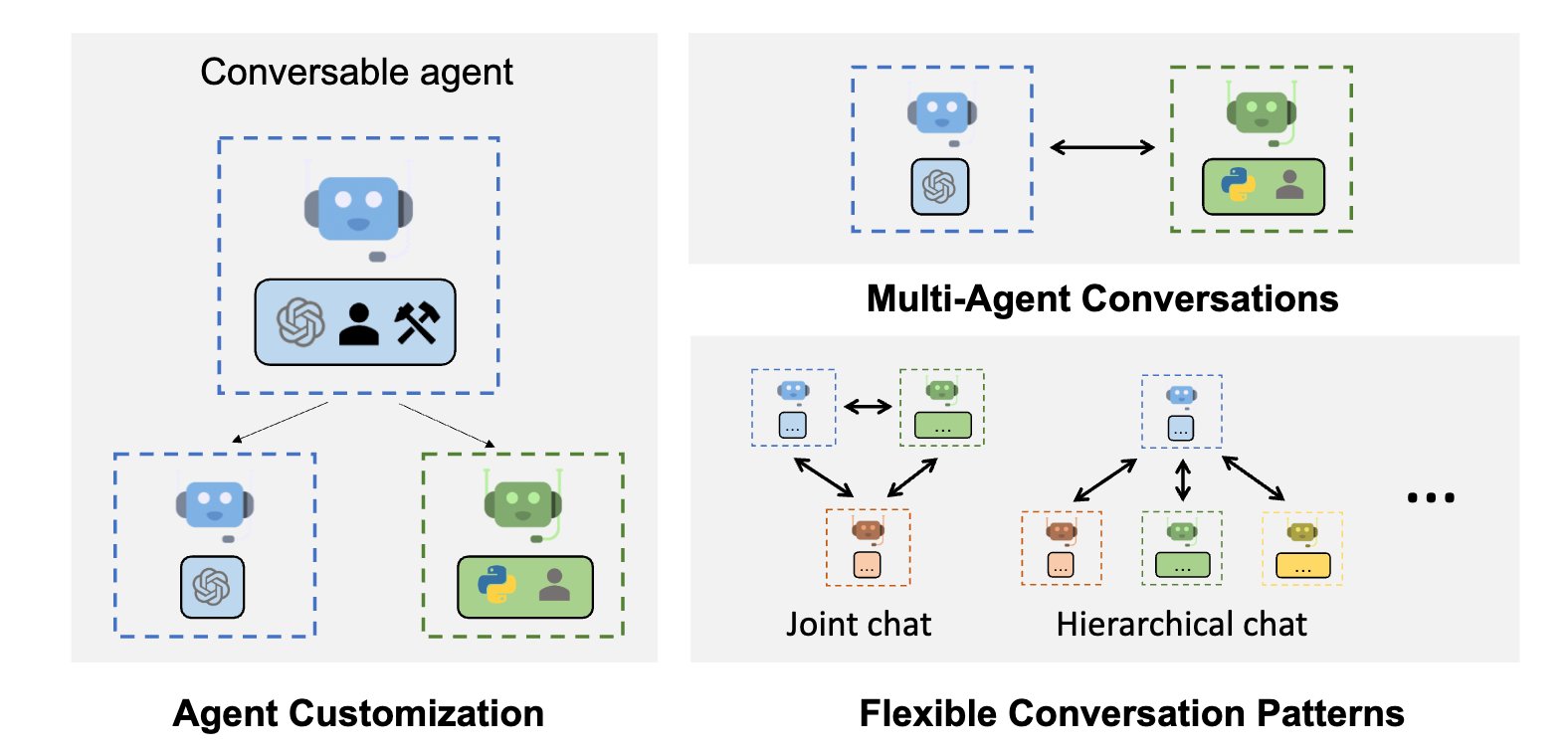
> AutoGen is a framework that enables the development of LLM applications using multiple agents that can converse with each other to solve tasks.
Click here to check out the latest integration of Autogen with Portkey
 ## Quick Start Integration
Autogen supports a concept of `config\_list` which allows definitions of the LLM provider and model to be used. Portkey seamlessly integrates into the Autogen framework through a custom config we create.
### Example using minimal configuration
```py theme={null}
from autogen import AssistantAgent, UserProxyAgent, config_list_from_json
# Import the portkey library to fetch helper functions
from portkey_ai import PORTKEY_GATEWAY_URL, createHeaders
config_list = [
{
"api_key": 'Your OpenAI Key',
"model": "gpt-3.5-turbo",
"base_url": PORTKEY_GATEWAY_URL,
"api_type": "openai",
"default_headers": createHeaders(
api_key = "Your Portkey API Key",
provider = "openai",
)
}
]
assistant = AssistantAgent("assistant", llm_config={"config_list": config_list})
user_proxy = UserProxyAgent("user_proxy", code_execution_config={"work_dir": "coding", "use_docker": False}) # IMPORTANT: set to True to run code in docker, recommended
user_proxy.initiate_chat(assistant, message="Say this is also a test - part 2.")
# This initiates an automated chat between the two agents to solve the task
```
Notice that we updated the `base_url` to Portkey's AI Gateway and then added `default_headers` to enable Portkey specific features.
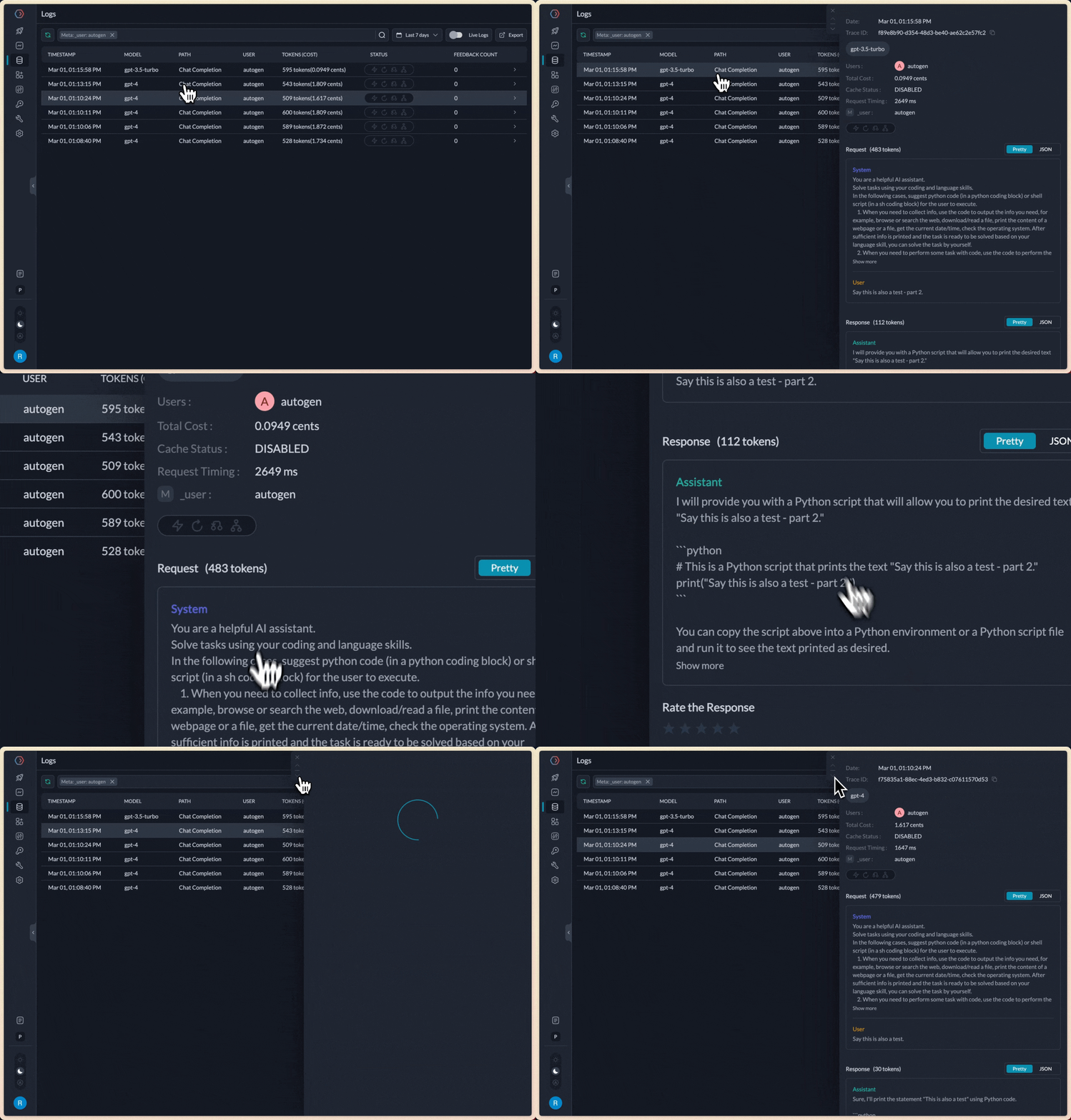
When we execute this script, it would yield the same results as without Portkey, but every request can now be inspected in the Portkey Analytics & Logs UI - including token, cost, accuracy calculations.
## Quick Start Integration
Autogen supports a concept of `config\_list` which allows definitions of the LLM provider and model to be used. Portkey seamlessly integrates into the Autogen framework through a custom config we create.
### Example using minimal configuration
```py theme={null}
from autogen import AssistantAgent, UserProxyAgent, config_list_from_json
# Import the portkey library to fetch helper functions
from portkey_ai import PORTKEY_GATEWAY_URL, createHeaders
config_list = [
{
"api_key": 'Your OpenAI Key',
"model": "gpt-3.5-turbo",
"base_url": PORTKEY_GATEWAY_URL,
"api_type": "openai",
"default_headers": createHeaders(
api_key = "Your Portkey API Key",
provider = "openai",
)
}
]
assistant = AssistantAgent("assistant", llm_config={"config_list": config_list})
user_proxy = UserProxyAgent("user_proxy", code_execution_config={"work_dir": "coding", "use_docker": False}) # IMPORTANT: set to True to run code in docker, recommended
user_proxy.initiate_chat(assistant, message="Say this is also a test - part 2.")
# This initiates an automated chat between the two agents to solve the task
```
Notice that we updated the `base_url` to Portkey's AI Gateway and then added `default_headers` to enable Portkey specific features.
When we execute this script, it would yield the same results as without Portkey, but every request can now be inspected in the Portkey Analytics & Logs UI - including token, cost, accuracy calculations.
 All the config parameters supported in Portkey are available for use as part of the headers. Let's look at some examples:
## Using 100+ models in Autogen through Portkey
Since Portkey [seamlessly connects to 150+ models across providers](/integrations/llms), you can easily connect any of these to now run with Autogen.
Let's see an example using **Mistral-7B on Anyscale** running with Autogen seamlessly:
```py theme={null}
from autogen import AssistantAgent, UserProxyAgent, config_list_from_json
# Import the portkey library to fetch helper functions
from portkey_ai import PORTKEY_GATEWAY_URL, createHeaders
config_list = [
{
"api_key": 'Your Anyscale API Key',
"model": "mistralai/Mistral-7B-Instruct-v0.1",
"base_url": PORTKEY_GATEWAY_URL,
"api_type": "openai", # Portkey conforms to the openai api_type
"default_headers": createHeaders(
api_key = "Your Portkey API Key",
provider = "anyscale",
)
}
]
assistant = AssistantAgent("assistant", llm_config={"config_list": config_list})
user_proxy = UserProxyAgent("user_proxy", code_execution_config={"work_dir": "coding", "use_docker": False}) # IMPORTANT: set to True to run code in docker, recommended
user_proxy.initiate_chat(assistant, message="Say this is also a test - part 2.")
# This initiates an automated chat between the two agents to solve the task
```
## Using Model Catalog
[Model Catalog](/product/model-catalog) in Portkey lets you manage provider credentials centrally. Add your Anyscale API key to Model Catalog and use the AI Provider slug in your config.
```py theme={null}
from autogen import AssistantAgent, UserProxyAgent, config_list_from_json
# Import the portkey library to fetch helper functions
from portkey_ai import PORTKEY_GATEWAY_URL, createHeaders
config_list = [
{
"api_key": "PORTKEY_API_KEY",
# Pick the model from the provider of your choice
"model": "mistralai/Mistral-7B-Instruct-v0.1",
"base_url": PORTKEY_GATEWAY_URL,
"api_type": "openai", # Portkey conforms to the openai api_type
"default_headers": createHeaders(
api_key = "Your Portkey API Key",
# Add your AI Provider slug from Model Catalog
provider = "@anyscale-prod",
)
}
]
assistant = AssistantAgent("assistant", llm_config={"config_list": config_list})
user_proxy = UserProxyAgent("user_proxy", code_execution_config={"work_dir": "coding", "use_docker": False}) # IMPORTANT: set to True to run code in docker, recommended
user_proxy.initiate_chat(assistant, message="Say this is also a test - part 2.")
# This initiates an automated chat between the two agents to solve the task
```
## Using Configs
[Configs](/product/ai-gateway/configs) in Portkey unlock advanced management and routing functionality including [load balancing](/product/ai-gateway/load-balancing), [fallbacks](/product/ai-gateway/fallbacks), [canary testing](/product/ai-gateway/canary-testing), [switching models](/product/ai-gateway/universal-api) and more.
You can use Portkey configs in Autogen like this:
```py theme={null}
from autogen import AssistantAgent, UserProxyAgent, config_list_from_json
# Import the portkey library to fetch helper functions
from portkey_ai import PORTKEY_GATEWAY_URL, createHeaders
config_list = [
{
# Set a dummy value, since we'll pick the API key from the config
"api_key": 'X',
# Pick the model from the provider of your choice
"model": "mistralai/Mistral-7B-Instruct-v0.1",
"base_url": PORTKEY_GATEWAY_URL,
"api_type": "openai", # Portkey conforms to the openai api_type
"default_headers": createHeaders(
api_key = "Your Portkey API Key",
# Add your Portkey config id
config = "Your Config ID",
)
}
]
assistant = AssistantAgent("assistant", llm_config={"config_list": config_list})
user_proxy = UserProxyAgent("user_proxy", code_execution_config={"work_dir": "coding", "use_docker": False}) # IMPORTANT: set to True to run code in docker, recommended
user_proxy.initiate_chat(assistant, message="Say this is also a test - part 2.")
# This initiates an automated chat between the two agents to solve the task
```
All the config parameters supported in Portkey are available for use as part of the headers. Let's look at some examples:
## Using 100+ models in Autogen through Portkey
Since Portkey [seamlessly connects to 150+ models across providers](/integrations/llms), you can easily connect any of these to now run with Autogen.
Let's see an example using **Mistral-7B on Anyscale** running with Autogen seamlessly:
```py theme={null}
from autogen import AssistantAgent, UserProxyAgent, config_list_from_json
# Import the portkey library to fetch helper functions
from portkey_ai import PORTKEY_GATEWAY_URL, createHeaders
config_list = [
{
"api_key": 'Your Anyscale API Key',
"model": "mistralai/Mistral-7B-Instruct-v0.1",
"base_url": PORTKEY_GATEWAY_URL,
"api_type": "openai", # Portkey conforms to the openai api_type
"default_headers": createHeaders(
api_key = "Your Portkey API Key",
provider = "anyscale",
)
}
]
assistant = AssistantAgent("assistant", llm_config={"config_list": config_list})
user_proxy = UserProxyAgent("user_proxy", code_execution_config={"work_dir": "coding", "use_docker": False}) # IMPORTANT: set to True to run code in docker, recommended
user_proxy.initiate_chat(assistant, message="Say this is also a test - part 2.")
# This initiates an automated chat between the two agents to solve the task
```
## Using Model Catalog
[Model Catalog](/product/model-catalog) in Portkey lets you manage provider credentials centrally. Add your Anyscale API key to Model Catalog and use the AI Provider slug in your config.
```py theme={null}
from autogen import AssistantAgent, UserProxyAgent, config_list_from_json
# Import the portkey library to fetch helper functions
from portkey_ai import PORTKEY_GATEWAY_URL, createHeaders
config_list = [
{
"api_key": "PORTKEY_API_KEY",
# Pick the model from the provider of your choice
"model": "mistralai/Mistral-7B-Instruct-v0.1",
"base_url": PORTKEY_GATEWAY_URL,
"api_type": "openai", # Portkey conforms to the openai api_type
"default_headers": createHeaders(
api_key = "Your Portkey API Key",
# Add your AI Provider slug from Model Catalog
provider = "@anyscale-prod",
)
}
]
assistant = AssistantAgent("assistant", llm_config={"config_list": config_list})
user_proxy = UserProxyAgent("user_proxy", code_execution_config={"work_dir": "coding", "use_docker": False}) # IMPORTANT: set to True to run code in docker, recommended
user_proxy.initiate_chat(assistant, message="Say this is also a test - part 2.")
# This initiates an automated chat between the two agents to solve the task
```
## Using Configs
[Configs](/product/ai-gateway/configs) in Portkey unlock advanced management and routing functionality including [load balancing](/product/ai-gateway/load-balancing), [fallbacks](/product/ai-gateway/fallbacks), [canary testing](/product/ai-gateway/canary-testing), [switching models](/product/ai-gateway/universal-api) and more.
You can use Portkey configs in Autogen like this:
```py theme={null}
from autogen import AssistantAgent, UserProxyAgent, config_list_from_json
# Import the portkey library to fetch helper functions
from portkey_ai import PORTKEY_GATEWAY_URL, createHeaders
config_list = [
{
# Set a dummy value, since we'll pick the API key from the config
"api_key": 'X',
# Pick the model from the provider of your choice
"model": "mistralai/Mistral-7B-Instruct-v0.1",
"base_url": PORTKEY_GATEWAY_URL,
"api_type": "openai", # Portkey conforms to the openai api_type
"default_headers": createHeaders(
api_key = "Your Portkey API Key",
# Add your Portkey config id
config = "Your Config ID",
)
}
]
assistant = AssistantAgent("assistant", llm_config={"config_list": config_list})
user_proxy = UserProxyAgent("user_proxy", code_execution_config={"work_dir": "coding", "use_docker": False}) # IMPORTANT: set to True to run code in docker, recommended
user_proxy.initiate_chat(assistant, message="Say this is also a test - part 2.")
# This initiates an automated chat between the two agents to solve the task
```